Start Using PagerDuty Today
Try PagerDuty free for 14 days — no credit card required.
PagerDuty integrations require a Manager, Admin or Account Owner base role or higher for account authorization. If you do not have one of these roles, please reach out to an Admin or Account Owner within your organization to configure the integration.
There are two ways that New Relic can be integrated with PagerDuty: via Global Event Routing or through an integration on a PagerDuty Service.
If you are adding New Relic to an existing PagerDuty service, please skip to the Integrating with a PagerDuty Service section of this guide.
Integrating with Global Event Routing enables you to route events to specific services based on the payload of the event from New Relic. If you would like to learn more, please visit our article on Global Event Routing.
1. From the Automation menu, select Event Rules and click your Default Global Ruleset.
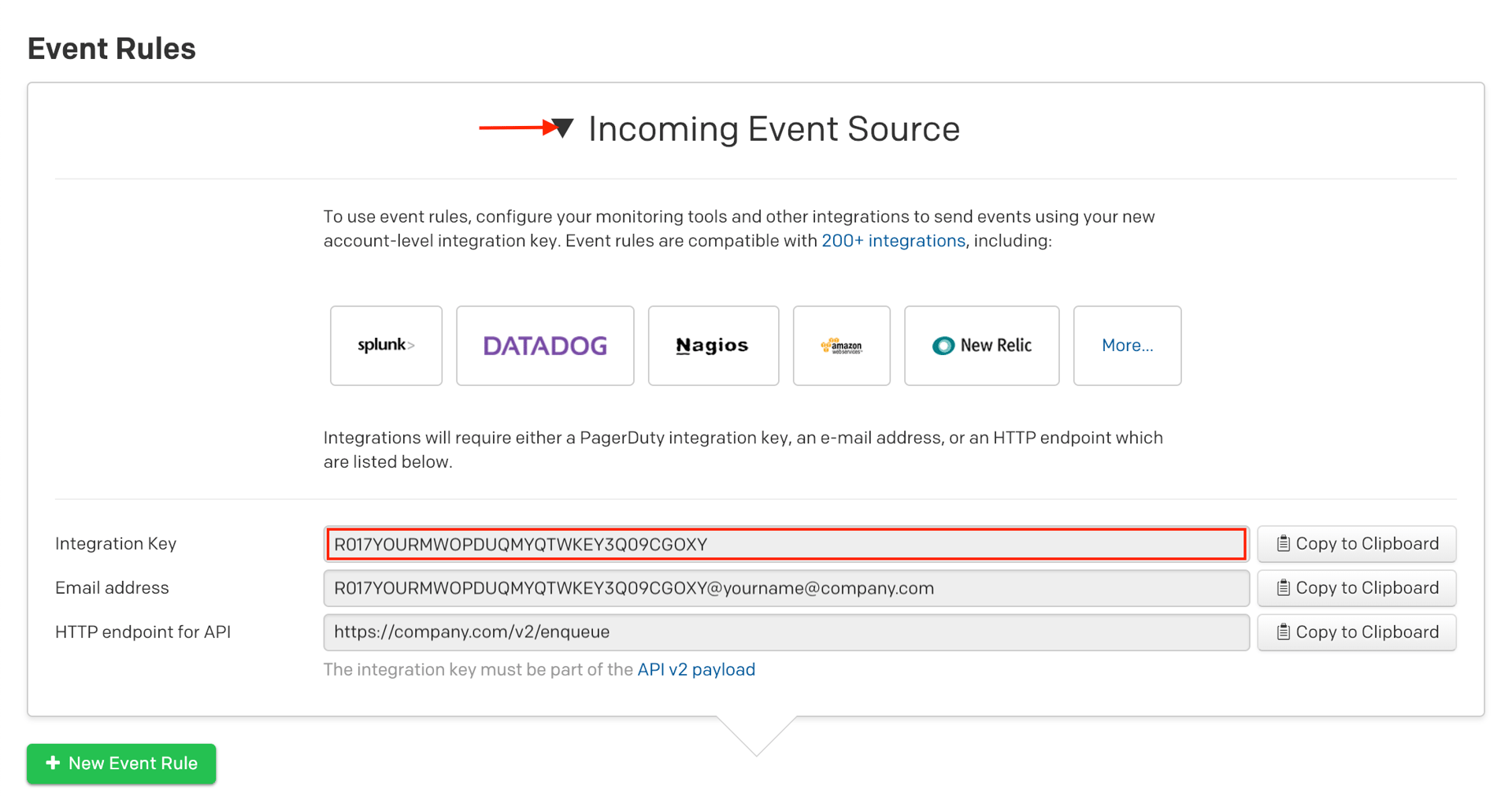
2. On the Event Rules screen, click on the arrow next to Incoming Event Source to display the Integration key information. Copy your Integration Key and keep it in a safe place for later use. This is the same integration key you will use for any other tool you want to integrate with using event rules. When you have finished setting up the integration in New Relic, you will return to this interface to specify how to route events from New Relic to services in PagerDuty.
Note: If your team has already integrated using Global Event Routing, you can verify by looking up the PagerDuty Event Rules Integration Key (found in steps 1 and 2 above) in New Relic’s Notification channels tab and clicking on PagerDuty under the Type heading. You can then use the existing integration and pipe New Relic events into your service by writing new Global Event Rules for your service.
You can now proceed to the In New Relic section of this guide.
Integrating with a PagerDuty service directly can be beneficial if you don’t need to route alerts from New Relic to different responders based on the event payload. You can still use service-level event rules to perform actions such as suppressing non actionable alerts and adjusting the severity.
1. From the Services menu, select Service Directory.
2. If you are adding your integration to an existing service, click the name of the service you want to add the integration to. Then select the Integrations tab and click Add a new integration.
If you are creating a new service for your integration, please read our documentation section Configuring Services and Integrations and follow the steps outlined in the Create a New Service section, selecting New Relic as the Integration Type in step 4. Continue with the In New Relic section (below) once you have finished these steps.
3. Enter an Integration Name in the format `monitoring-tool-service-name` (e.g., New Relic-Shopping-Cart) and select New Relic from the Integration Type menu.
4. Click the Add Integration button to save your new integration. You will be redirected to the Integrations tab for your service.
5. An Integration Key will be generated on this screen. Keep this key saved in a safe place, as it will be used when you configure the integration with New Relic in the next section.
1. Go to Alerts, select the Notification Channels tab and then click New notification channel.
2. Select PagerDuty from the Select a channel type menu. Give your channel a Service name, then paste the Integration Key (generated in step 2 of Integrating With Global Event Routing or step 5 of Integrating With a PagerDuty Service, above) into the Service API key field and click Create channel.
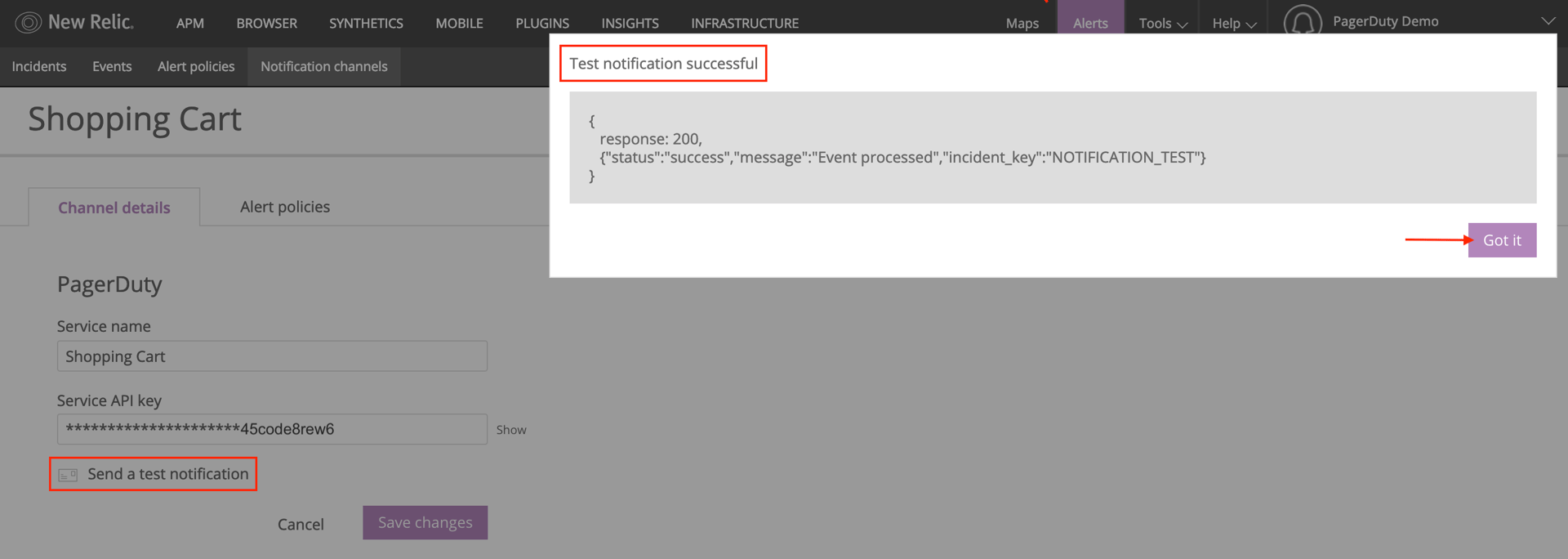
3. Click Send a test notification to verify that your integration key was entered correctly and that an incident can be triggered in PagerDuty. Click Got it.
If you do not see an incident triggered in PagerDuty, check the response for errors and make sure someone is on-call for your service.
4. After the channel has been created, go to the Alert policies tab and click Add alert policies.
5. Check the alert policies that you want to trigger incidents in PagerDuty, then click Save changes.
Congratulations, New Relic will now be able to trigger and resolve incidents for this service in PagerDuty!
Yes, you can tie New Relic to multiple PagerDuty services by creating additional services in PagerDuty and additional channels in New Relic which use different PagerDuty Service Integration Keys. This is extremely useful for organizing your alerts with their respective services and dividing them to different escalation policies so that the proper team is notified for relevant incidents.
Try PagerDuty free for 14 days — no credit card required.