
Application Slack de PagerDuty : Nouvelles fonctionnalités de gestion des incidents
par Cristina Dias
6 mai 2026 | 6 min de lecture
Nous allons déployer de nouvelles fonctionnalités Slack pour éliminer une grande partie des tâches manuelles de votre flux de travail de gestion des incidents : un seul clic suffit pour transformer une alerte en incident, des canaux dédiés sont créés automatiquement, vous pouvez contacter les intervenants sans quitter Slack et gérer tous vos paramètres au même endroit.
Cela fait partie de notre voie vers les opérations autonomes Réduire la charge de travail, préserver votre capacité et maintenir votre productivité : si vous utilisez PagerDuty uniquement pour la planification des astreintes, vous passez à côté de l’essentiel. Ces fonctionnalités Slack sont optimales lorsqu’elles sont intégrées au reste de la plateforme : filtrage des alertes par Event Intelligence, tri autonome des problèmes par les agents et gestion complète des incidents au sein d’un seul système.
Voici ce qui arrive (accès anticipé prévu pour mai)
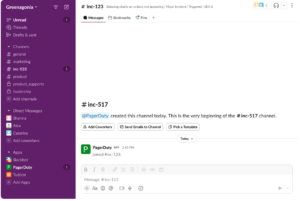
1. Créez un canal dédié pour chaque incident majeur.
Vous connaissez cette situation : gérer un incident sur un canal partagé alors que les alertes affluent, parcourir des centaines de messages pour trouver des mises à jour cruciales, voir de nouveaux intervenants rejoindre le groupe et poser des questions. 'ce qui se passe?' car le contexte est enfoui.
Les canaux d'incidents dédiés et automatisés résolvent ce problème. Lorsque vous déclarez un incident ou diffusez une alerte, PagerDuty crée un canal (par exemple #inc-1234-database-outage) où :
- Toutes les activités liées à un incident sont centralisées, y compris la chronologie, les actions des intervenants, les changements de statut et bien d'autres aspects automatisés.
- Les nouveaux intervenants voient tout au même endroit, y compris les informations sur l'incident épinglées.
- Vos canaux de triage (pour les alertes et les problèmes entrants) restent propres
- Les examens post-incident comportent un enregistrement complet
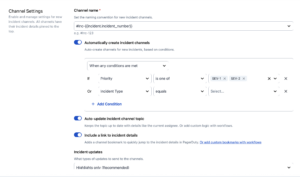
Vous pourrez contrôler la création des chaînes. Configurez la diffusion par priorité (P1 et P2 uniquement), par type d'incident ou selon d'autres options. Pour les incidents majeurs, diffusez les mises à jour de statut sur les canaux d'annonce tout en conservant les informations détaillées sur le canal dédié.
Découvrez pourquoi les canaux de gestion des incidents dédiés constituent une bonne pratique. ce blog .
2. Répondre aux messages sans quitter Slack
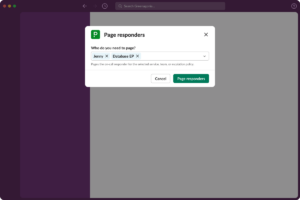
En plein incident et besoin de l'équipe de base de données ? Il vous suffira de taper /pd base de données de garde Pour voir qui est d'astreinte et les contacter en un clic, ils recevront une notification et rejoindront le canal dédié à l'incident. Vous restez dans Slack.
Fonctionne pour toute escalade : notification d’un utilisateur, d’une équipe ou d’une politique d’escalade. Plus besoin de passer par la console web pour consulter les plannings ou créer des notifications. De plus, /pd page Cette commande affichera une fenêtre modale contenant toutes les informations de garde issues de vos politiques d'escalade, et bien plus encore.
3. Gérez tous les paramètres Slack en un seul endroit.
Si vous avez configuré des intégrations Slack sur plusieurs services et équipes, vous connaissez le problème : des paramètres éparpillés partout, un comportement incohérent, et aucune façon claire de voir ce qui est configuré et où.
Bientôt, vous irez à Intégrations > Configuration Slack gérer :
- Lorsque des canaux de gestion des incidents dédiés sont créés (priorité, service, équipe)
- Conventions et valeurs par défaut de dénomination des canaux
- Préférences de notification
- Configuration du canal d'annonce
- permissions de la commande slash
- Exceptions spécifiques au service
Configurez une seule fois au lieu de plusieurs. Fini les prises de tête avec plusieurs réglages.
4. Maintenir l'engagement des intervenants
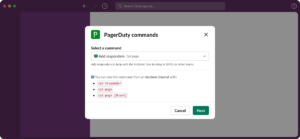
Vous gérez un incident et devez vérifier qui est impliqué. Au lieu de poser la question sur le canal ou de consulter la console web, vous pourrez voir les intervenants directement sur la fiche d'incident.
Les nouvelles fonctionnalités de gestion des intervenants comprendront notamment :
En utilisant /pd répondeur vous permettra de :
- Voir les réponses avec l'état de l'accusé de réception directement dans la fiche d'incident
- Renvoyer une notification répondants qui n'ont pas vu la page initiale
Vous pourrez également rouvrir les incidents résolus. en un seul clic et la chaîne d'origine se réactive avec tout son contexte.
Tout est géré depuis Slack, vous pouvez donc vous concentrer sur la coordination.
5. Familiarisez votre équipe avec les tutoriels d'intégration.
Sur la plateforme PagerDuty comme dans Slack, nous simplifions l'apprentissage des bonnes pratiques pour les nouveaux utilisateurs. Des tutoriels les aideront à :
- Connectez-vous et authentifiez l'application
- Comprendre la reconnaissance et la création d'incidents
- Découvrez les actions qu'ils peuvent entreprendre pour accélérer le MTTR.
Pas de sessions de formation séparées. Pas de recherche de documentation. Votre équipe apprend le flux de travail au moment précis où elle en a besoin.
Vous disposez déjà de la plateforme, exploitez-la pleinement.
Ces capacités s'appuient sur Améliorations de Slack que nous avons mises en place plus tôt cette année :
- Fiches d'incident repensées avec des informations claires, des émojis mis à jour et une meilleure hiérarchie de l'information.
- mises à jour d'activité par fil de discussion qui permettent de maintenir l'activité liée aux incidents organisée et de réduire le bruit sur les canaux de communication.
- Nouvelles commandes slash intuitives avec une fenêtre modale affichant les commandes et paramètres disponibles.
Mais elles font partie de quelque chose de plus vaste : notre chemin vers des opérations autonomes. S'appuie sur 16 années de renseignement opérationnel PagerDuty est conçu spécifiquement pour l'ère de l'IA. Voici ce que cela signifie pour vous :
- Event Intelligence filtre et regroupe vos alertes avant qu'elles n'arrivent sur Slack.
- Un agent SRE peut trier et résoudre les problèmes avant même qu'ils ne fassent appel à qui que ce soit. Il effectue des diagnostics, met en œuvre des mesures correctives et intervient directement dans vos canaux Slack. Lorsqu'un incident nécessite une intervention humaine, l'agent a déjà réalisé l'investigation initiale. Vous pouvez même ajouter l'agent SRE directement aux planifications et aux politiques d'escalade en tant qu'intervenant virtuel (disponible en accès anticipé).
- Faites appel aux bonnes personnes, en tirant parti de vos horaires d'astreinte et de vos politiques d'escalade. Le /pd sur appel La commande extrait les informations de vos plannings existants. Les pages d'alerte pour les promotions sont envoyées aux personnes concernées en fonction de vos politiques d'escalade.
- Décalage vers la gauche avec les intégrations pour développeurs. Les intégrations MCP de PagerDuty apportent le contexte opérationnel directement dans des outils comme Cursor et Claude Code, permettant ainsi aux développeurs de créer en toute confiance et de prévenir les incidents avant qu'ils ne surviennent.
En cas de panne à 3 heures du matin, vous n'avez pas à jongler avec plusieurs outils ni à vous demander quel fournisseur appeler. Tout passe par un système unique que vous connaissez déjà.
À quoi s'attendre à partir de juin
Ces fonctionnalités seront disponibles pour tous les clients PagerDuty utilisant Slack. Les canaux dédiés aux incidents seront activés par défaut, mais vous pouvez les personnaliser ou les désactiver à tout moment.
Nous vous recommandons de revoir votre Configuration Slack avant le déploiement automatique :
- Connectez-vous à PagerDuty et accédez à Intégrations > Configuration Slack
- Vérifiez les paramètres par défaut des canaux d'incident dédiés.
- Personnalisez en fonction de vos flux de travail (par exemple, créez des canaux uniquement pour les incidents P1/P2).
- Mettez l'expérience à l'épreuve en déclarant un incident de test
- Partagez avec votre équipe pour que chacun sache à quoi s'attendre.
Commencez dès aujourd'hui
La gestion complète des incidents dans Slack élimine les changements de contexte qui vous ralentissent pendant les incidents. Gérez l'intégralité du cycle de vie des incidents depuis Slack et concentrez-vous sur leur résolution. Rejoignez le programme d'accès anticipé.