PagerDuty Agenten-App auf GitHub: Vorfallkontext, in dem Sie bereits arbeiten
von Hannah Culver
1. Juli 2026 | 4 Minuten Lesezeit
Dieser Blogbeitrag ist Teil der fortlaufenden Serie von PagerDuty darüber, wie wir Kunden auf ihrem Weg zum autonomen Betrieb unterstützen. Lesen Sie weiter, um mehr darüber zu erfahren. PagerDuty Agenten-App auf GitHub (Früher Zugriff) und wie es auf diese Vision hinarbeitet.
Wie viele Tabs haben Sie gerade geöffnet? Und wie viele öffnen Sie noch, sobald ein Ereignis eintritt?
Das ständige Wechseln zwischen verschiedenen Tools während der Reaktion auf Sicherheitsvorfälle ist eine der häufigsten und zeitraubendsten Aufgaben im Software-Engineering. Kritische Daten wie Vorfallhistorie, Deployment-Korrelationen, Serviceabhängigkeiten, Runbooks und vieles mehr sind auf ein Dutzend verschiedener Tools verteilt. Man springt zwischen verschiedenen Tools hin und her, setzt die Informationen manuell zusammen und hat, bis man sich einen Überblick verschafft hat, den Fokus auf die eigentliche Fehlerbehebung bereits verloren.
Manche dieser Vorfälle sind komplett vermeidbar. Mit den richtigen Informationen vor dem Deployment kann ein Entwickler fundiertere Entscheidungen treffen, noch bevor der Code ausgeliefert wird – durch frühzeitiges Reagieren (Shift-Left) lässt sich ein Vorfall verhindern. Die dafür benötigten Informationen sind in PagerDuty verfügbar. Entwickler verbringen jedoch nicht immer die meiste Zeit dort, wo sie sich aufhalten: in GitHub. Dank dieser Daten (und des PagerDuty SRE-Agenten), die nun über GitHub verfügbar sind, können Sie in Ihrem bevorzugten Tool bleiben und sich das ständige Wechseln zwischen Tabs sparen.
Der Pull Request (PR) ist der Ort, an dem die Fehlerbehebung erfolgt. Der Kontext des Vorfalls sollte ebenfalls dort enthalten sein.
Die PagerDuty -Agent-App in GitHub bringt den aktuellen Vorfallstatus, Änderungskorrelationen und den operativen Kontext direkt in Ihre Pull-Anfragen, ohne dass Sie GitHub verlassen müssen.
Folgendes bewirkt es:
- Zeigt Live-Ereignisdaten in Ihrer PR an. Sie sehen aktive Vorfälle, den Zustand der Dienste und Änderungskorrelationen sofort, wenn Sie einen Pull Request für einen betroffenen Dienst öffnen.
- Verbindet sich mit der Ereignishistorie. Frühere P1-Vorgänge, wiederkehrende Fehlermuster und Vorfallsnotizen über verschiedene Dienste hinweg können direkt aus dem PR in einfacher Sprache abgefragt werden.
- Führt Risikobewertungen vor der Auftragserteilung durch. Erwähnen Sie die PagerDuty Agenten-App direkt in einem PR-Kommentar und erhalten Sie eine Risikobewertung basierend auf Live-Vorfallsdaten, Bereitstellungshistorie und Serviceabhängigkeiten, um einen Vorfall zu verhindern.
- Hält Sie in Ihrem Arbeitsablauf. Die Agenten-App, die auf dem Remote-MCP-Server und dem Advance -MCP-Server von PagerDuty (Frühzugriff) basiert, verknüpft GitHub- und PagerDuty Daten in Echtzeit, sodass Sie Shift Left nutzen können, während Sie dort arbeiten, wo Sie möchten.
Wie das in der Praxis aussieht
Stellen Sie sich einen Entwickler vor, der zum ersten Mal einen Zahlungsdienst bereitstellt. Er weiß, dass dieser Dienst Auswirkungen auf die Kunden hat und möchte das Risiko so gering wie möglich halten. Er erstellt einen Pull Request, erwähnt die PagerDuty Agenten-App mit einem @-Erwähnungslink und fragt: Kann ich diesen Dienst bereitstellen? Wie stabil ist er?
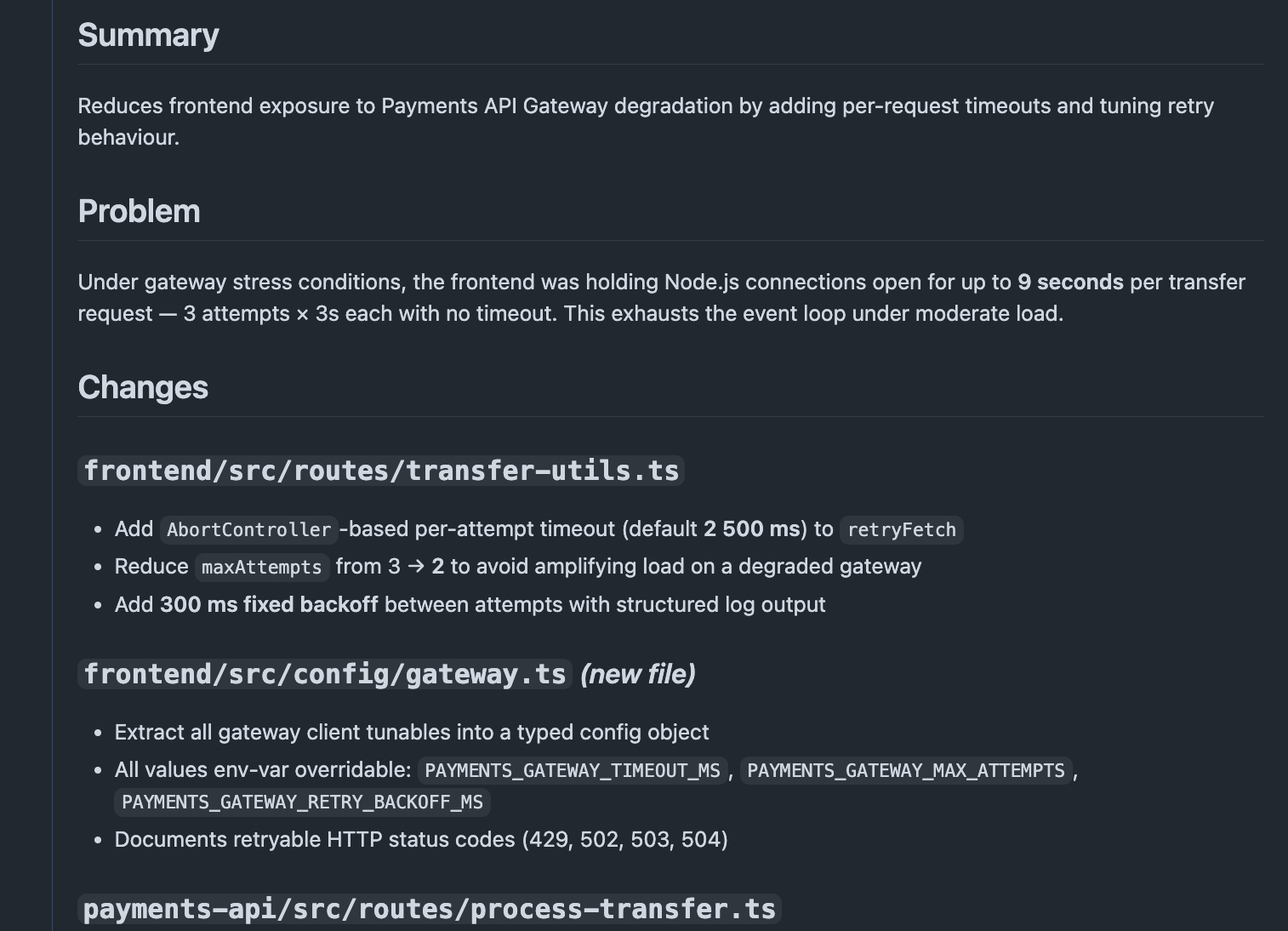
Innerhalb weniger Sekunden liefert die Agenten-App eine Risikobewertung. In diesem Fall: kritisch. Zwei aktive Vorfälle beeinträchtigen eine kritische Abhängigkeit. Die Risikofaktoren werden aufgeführt: Der Zweig ändert direkt die Gateway-Timeout-Logik, die mit dem aktuellen Fehlermuster verknüpft ist; der Dienst hat in den letzten 90 Tagen 68 P1-Vorfälle protokolliert; und in den Vorfallsnotizen wird wiederholt auf dasselbe Verhalten des Schutzschalters verwiesen.
Die Empfehlung: Verzögern Sie die Bereitstellung. Warten Sie auf mehr Stabilität. Dann können Sie sie bereitstellen.
Der Entwickler kontaktiert keinen erfahrenen Ingenieur. Er durchsucht kein veraltetes Runbook. Er öffnet weder Slack, noch prüft er die Statusseite oder ruft PagerDuty in einem separaten Tab auf. Er hat alles, was er braucht, um die richtige Entscheidung zu treffen – direkt im Tool, mit dem er sich bereits beschäftigt, und das innerhalb von Minuten.
Derselbe Workflow läuft umgekehrt ab, wenn die Produktion bereits beeinträchtigt ist. Wenn ein Vorfall einen Ihrer Dienste betrifft, zeigt die Agenten-App den aktuellen Vorfallstatus und die Änderungskorrelationen direkt im Pull Request an. So können Sie den auslösenden Commit identifizieren, eine Korrektur generieren und diese direkt mit dem Vorfall verknüpfen, ohne GitHub zu verlassen.
Der Weg zu autonomen Operationen
Die PagerDuty Agenten-App auf GitHub ist Teil der umfassenderen Vision von PagerDuty für autonome Abläufe: die richtigen Daten und Aktionen in den Tools, die Ihr Team bereits verwendet, genau dann, wenn es am wichtigsten ist.
GitHub bildet die Orchestrierungsebene. PagerDuty ist das operative Signal. Zusammen ergeben sie einen Agenten, der nicht nur Ihren Code, sondern auch das System, in dem er ausgeführt wird, versteht.
Die Integration ist ab heute verfügbar in GitHub PagerDuty Advance -Kunden können sich anmelden für Früher Zugriff Um MCP zu Advance , wird der SRE-Agent in diesem Workflow freigeschaltet. Sehen Sie, was wir sonst noch auf unserer Website gemacht haben. Seite „Produktneuheiten“ Die