Employee Success Stories
Security uses orchestration rules and incident workflows to extract relevant data for immediate incident coordination
Learn how the Security team eliminated 6-8 manual steps and reduced time to mobilize by automating CrowdStrike alert evaluation and incident coordination through orchestration rules and workflows.
- PagerDuty /
- Ops Guides /
- Using PD /
- Security Team
The Challenge
How They Were Working
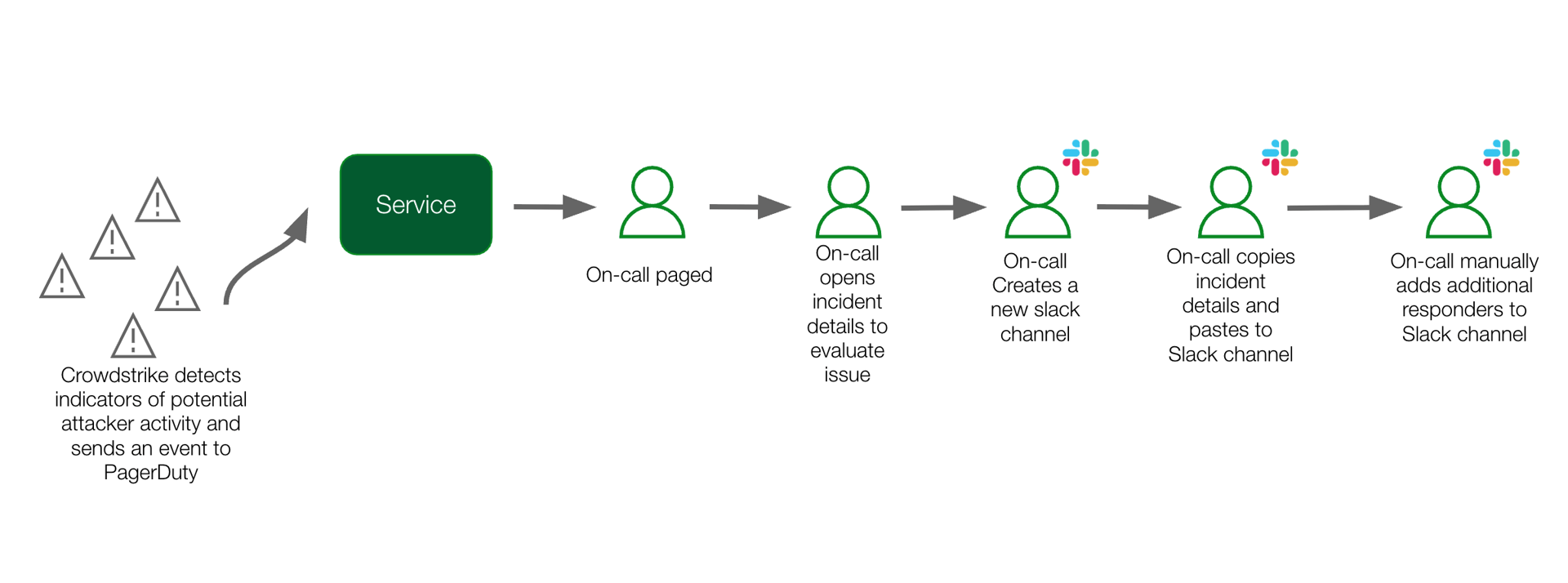
The Security team manually evaluated CrowdStrike alerts, extracting information from incident details through multiple clicks, creating Slack channels, adding responders, and posting context—all while working under time pressure to respond to potential security threats.
Pain Points
Manual Toil
Multiple manual steps required to evaluate CrowdStrike alert and execute actionable next steps.
Lack of immediate context
The information needed to review and evaluate the alert was embedded in the incident details and required multiple clicks to extract.
Room for human error
With multiple manual steps involved, there was room for human error with copy-pasting the wrong information or not including the right responders to the incident.
Key Challenge
Surfacing the right incident details to the right responders without manual, error-prone steps.
The Solution
What They Did
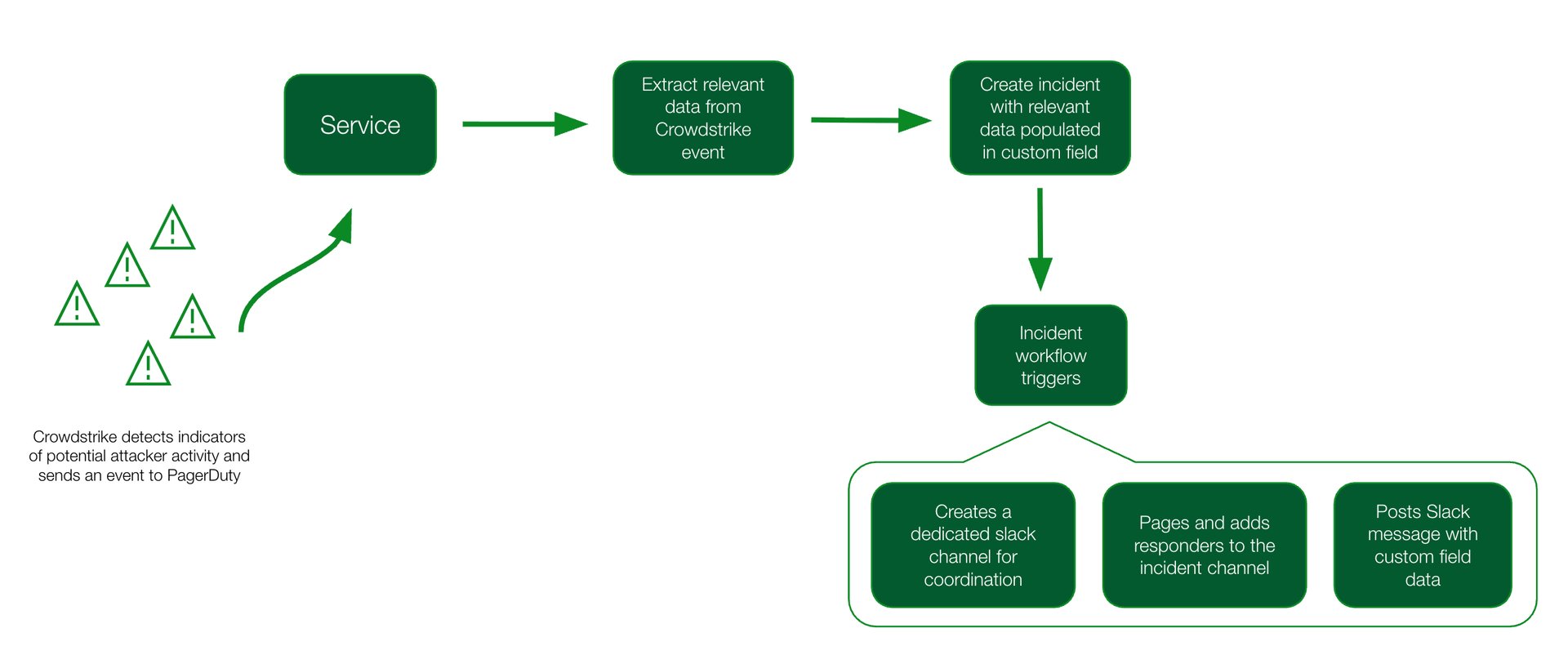
Create an orchestration rule that extracts the relevant payload details into an incident custom field
Create an incident workflow that:
- Triggers automatically based on the incident title
- Creates a private, dedicated incident Slack channel named after randomly generated words
- Pages responders and adds them to the incident channel
- Posts a message to the Slack channel using the incident custom field variable
- Uses if/then conditional logic to post different types of Slack channel messages based on the content of the alert
Products & Features Used
Incident Management
Centralized incident response and resolution platform
- Basic and advanced incident workflow actions
- Create Slack channel
- Add responders
- If/then conditional logic
- Incident custom fields
AIOps
AI-powered operations to reduce noise and accelerate response
- Orchestration rules
- Automated data extraction
- Alert enrichment
The Results
How They Are Now Working
With automated workflows and event field extractions, the team can focus on responding to incidents rather than manually digging for the incident details.
Wins
Reduced manual toil
Orchestration rules and several incident workflow steps replace the on-call's manual process.
Immediate context in the right place and at the right time
Immediately after the incident is triggered, the relevant data from the incident is extracted and shared with the on-call responders in a dedicated incident Slack channel.
No human error
With an automated incident workflow, the on-call is confident that the right steps were performed to begin working on the incident.
Outcomes
Eliminated manual steps
Reduced from 6-8 manual steps down to 0 steps through complete automation.
Reduced time to mobilize
Faster incident coordination with automated channel creation and responder notification.
Improved accuracy
Eliminated human error in data extraction and responder coordination.
Better incident context
Responders receive relevant alert data immediately in the incident channel.
Lessons Learned & Tips
- Use common event format fields to send information to PagerDuty for easier data extraction and enrichment
Ready to automate your security incident response?
Start your free trial today and see the difference.
Start Free Trial