Triage
How to communicate with internal stakeholders
Good vs better vs best practices for communicating with internal stakeholders in PagerDuty.
When Does This Matter
When there are high-severity incidents that impact customers or the business, keeping internal stakeholders informed is crucial. This includes executives, product managers, customer success teams, and anyone else who needs to know what's happening and what actions are being taken.
Why You Should Care
Clear communication during incidents avoids panic, reduces interruptions, ensures alignment on priority and scope, and helps leadership make informed decisions. Without structured stakeholder updates, responders get bombarded with ad-hoc questions, executives lack visibility into severity and progress, and teams struggle to coordinate cross-functional responses. Effective communication builds trust and keeps everyone focused on resolution.
PagerDuty Practices
PagerDuty can help facilitate internal stakeholder communications with the use of status update notifications and messages directed to specific chat channels.
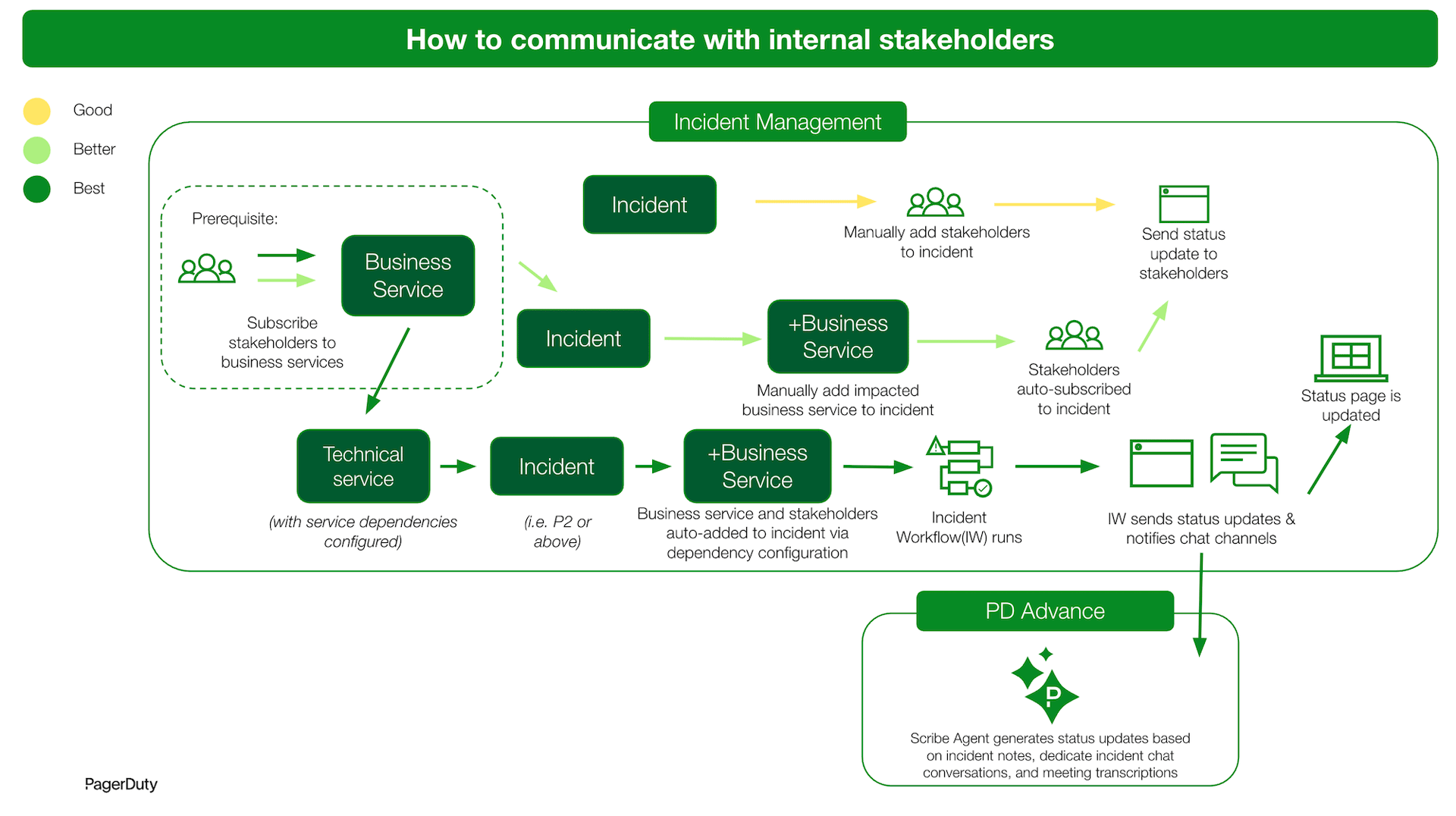
Description of Practices
Good
Subscribe stakeholder users or teams to an incident after identifying impact and scope. Then post status updates on the incident to notify the subscribed stakeholders.
Better
Subscribe stakeholders to business services and add those business services to an incident after identifying business impact and scope. This allows teams to focus on understanding the business impact rather than remembering which stakeholders to notify. Then post status updates on the incident to notify the subscribed stakeholders.
Best
Set up dependencies between technical and business services. This allows incidents above a certain priority level to automatically indicate the business service impacted and auto-subscribe stakeholders. Use incident workflows to notify stakeholders by auto-posting messages to an assigned chat channel and auto-posting status updates to the incident, which also updates an internal status page. Use PagerDuty’s GenAI capabilities to auto-draft continuous status updates based on the incident’s context.