Discover
What Alerts or Events to send to PagerDuty
Good vs better vs best practices for sending alerts or events to PagerDuty.
When Does This Matter
Whether you're getting started with PagerDuty or are a long-time PagerDuty user, it's always important to ensure that you and your team are sending the proper signals to PagerDuty to support your team's mission critical work.
Why You Should Care
PagerDuty is only as good as the signal you send to it. If you send in hundreds of noisy alerts, or send in too little information, responders will have a hard time knowing what to focus on and how to respond when they are paged.
PagerDuty Practices
PagerDuty can receive critical, non-critical, and contextual events to optimize your team's incident response and system health visibility.
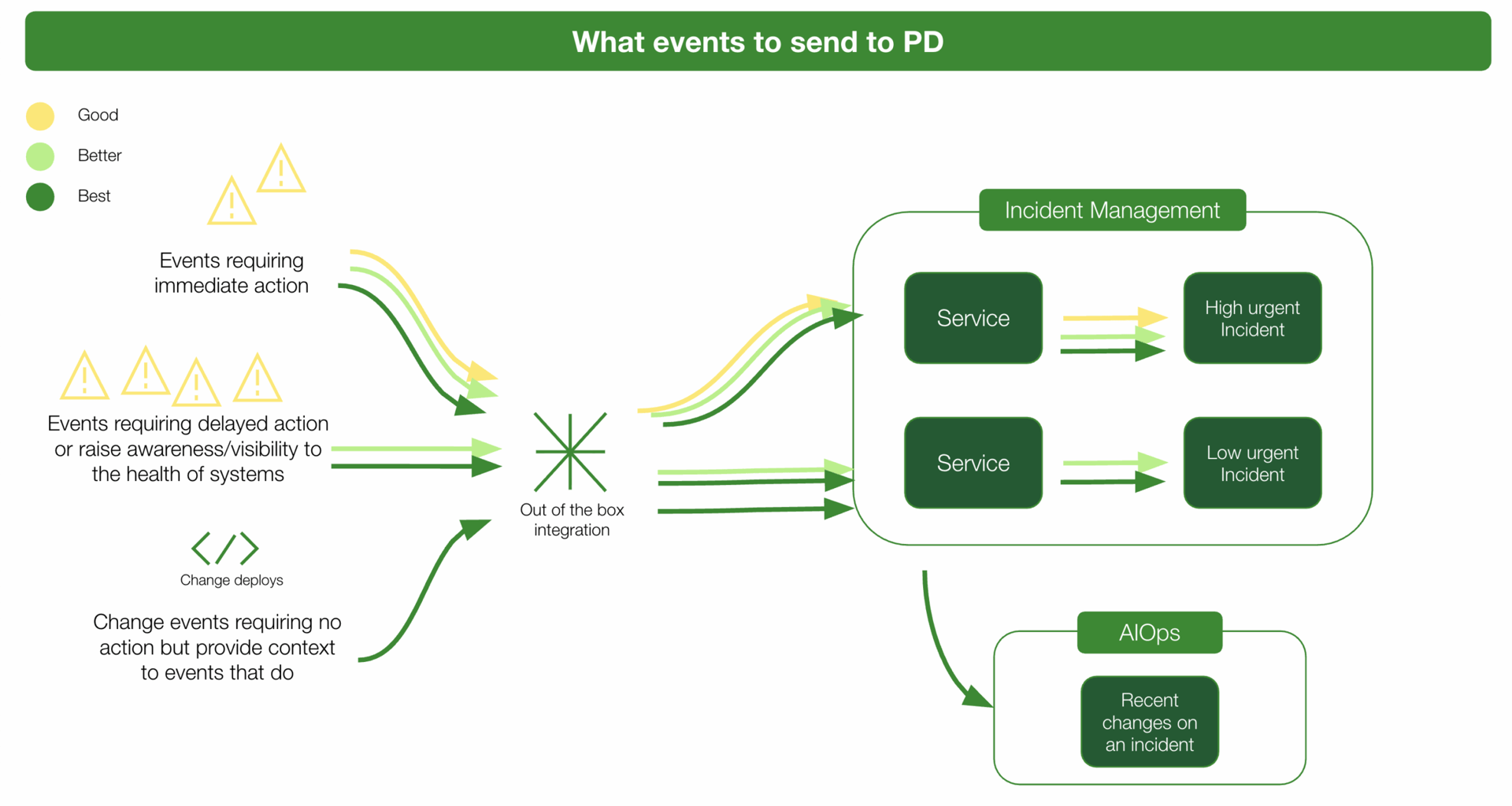
Description of Practices
Good
Send critical alerts requiring immediate action to PagerDuty for a quick response.
Better
"Good" + Send less critical alerts requiring delayed action to PagerDuty to hold teams accountable for deprioritized work. "Less critical alerts" may also be those that should raise awareness or visibility to teams about the health of their systems, even if they don't require immediate action.
Best
"Better" + Send change events to PagerDuty to correlate recent changes with active incidents to narrow down potential root cause.