Employee Success Stories
Customer Support uses PagerDuty Incident Workflows to automatically resolve common customer account requests
When a customer requests account changes, the Customer Support agent needs to verify the account before approving the change. The team automated this process using PagerDuty Incident Workflows thus eliminating manual research for every request.
- PagerDuty /
- Ops Guides /
- Using PD /
- Customer Support Workflows - Support Team
The Challenge
How They Were Working
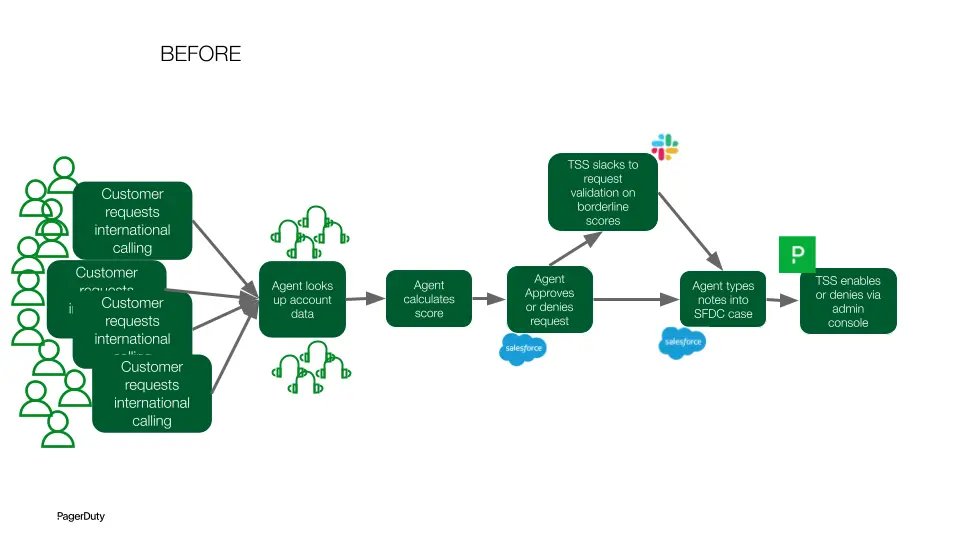
When a customer submitted a case requesting international notification enablement, a Customer Support agent manually reviewed the account to verify it was a legitimate company. The agent evaluated factors such as subscription type, MaxMind fraud score, number of services and integrations, incident history, user count, and company verifiability — deducting or adding points for each factor. The agent then manually entered a recommendation note into the case and either approved or denied the request based on the final score.
Pain Points
High Manual Effort Per Case
Each international notification enablement request required an agent to manually look up account data across multiple systems, calculate a legitimacy score, and document a recommendation — averaging 15 minutes per case.
High Case Volume
With ~26,000 support cases per year, approximately 10% (2,600 cases) involved international calling enablement requests, creating a significant recurring workload.
Inconsistency Risk
Manual scoring introduced the risk of human error or inconsistent application of the evaluation rubric across agents, potentially leading to incorrect approvals or denials.
The Solution
What They Did
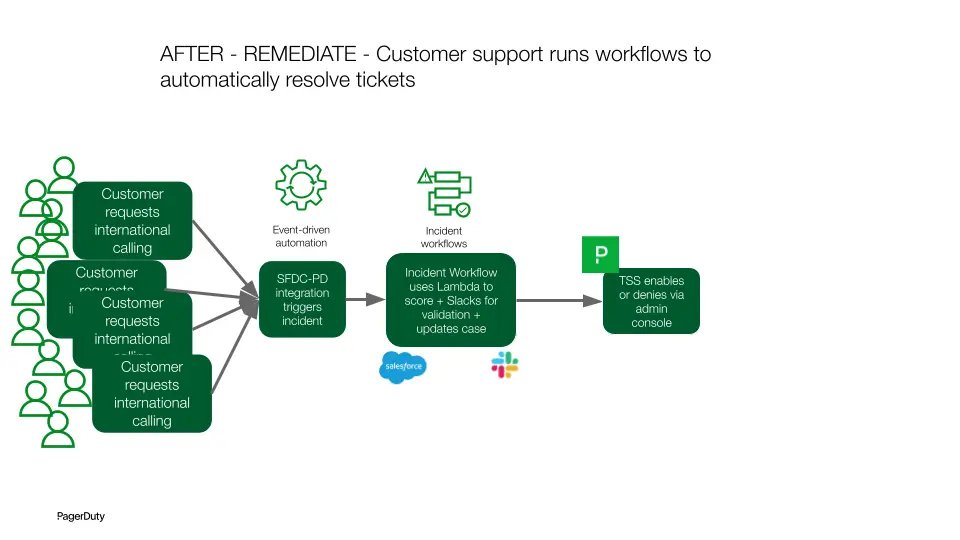
Integrated Salesforce (SFDC) with PagerDuty so that when an international notification enablement case is created in SFDC, an incident is automatically triggered in PagerDuty.
Built an Incident Workflow that fires on incident creation and invokes an AWS Lambda function containing the legitimacy scoring logic.
The Lambda function programmatically evaluates the account against the full scoring rubric — including subscription type, MaxMind score, number of services and integrations, incident history, user count, company verifiability, email patterns, and IP/timezone match — to determine whether the account is a real, legitimate business.
The workflow posts the calculated score and a clear approve/deny recommendation as a note directly back into the Salesforce case, so the agent can act immediately without any manual research.
The Results
How They Are Now Working
When a customer opens a support case to enable international notifications, PagerDuty automatically creates an incident and triggers a workflow. The workflow calls an AWS Lambda function that runs the full legitimacy scoring algorithm — verifying the account is a real company before enablement — and posts the score and approve/deny recommendation as a note back into the Salesforce case. Customer Support agents can immediately act on the recommendation without any manual research, resolving cases in seconds instead of minutes.
Testimonials
What used to take me 15 minutes per case now takes seconds. With thousands of these requests a year, having PagerDuty automatically score each account means I'm not spending hours every week on lookups — I just open the case and the answer is right there.
— PagerDuty Customer Support Agent
Wins
Time Saved
Eliminated ~15 minutes of manual work per case across ~2,600 international calling enablement requests per year — saving an estimated 642 hours annually (equivalent to 16 weeks of work).
Consistent Evaluations
Automated scoring ensures every request is evaluated against the same legitimacy rubric every time, reducing the risk of human error or inconsistent approvals.
Agent Capacity Freed
Customer Support agents spend zero time on manual account lookups and score calculations, freeing capacity for higher-value customer interactions.
Outcomes
Scalable Fraud Prevention
The workflow automatically verifies account legitimacy at scale before enabling international calling, ensuring the evaluation keeps pace with case volume growth.
Faster Case Resolution
Enablement requests that previously required 15 minutes of manual research are now resolved in seconds, improving both agent efficiency and the customer experience.
Lessons Learned & Tips
- Document your existing process before automating — the clearer the steps, the easier it is to build and maintain.
- Use PagerDuty Incident Workflows as the orchestration layer between your CRM and back-end automation to keep the integration low-code and maintainable.
- Automatically post comments directly back into the originating case as a note so agents have full context without leaving their primary tool.
- Keep a human in the loop for borderline cases — design the workflow to flag edge cases for agent review, so the team retains oversight.
Ready to transform your support workflow?
Start your free trial today and see the difference.
Start Free Trial