Employee Success Stories
Engineering generates Post-Incident Review for faster post-incident analysis
Engineering uses PagerDuty's native Post-Incident Reviews (PIRs) for major incident analysis leveraging PD Advance to draft context and polling PagerDuty to copy incident timeline data automatically
- PagerDuty /
- Ops Guides /
- Using PD /
- Jeli Analysis - Engineering Team
The Challenge
How They Were Working
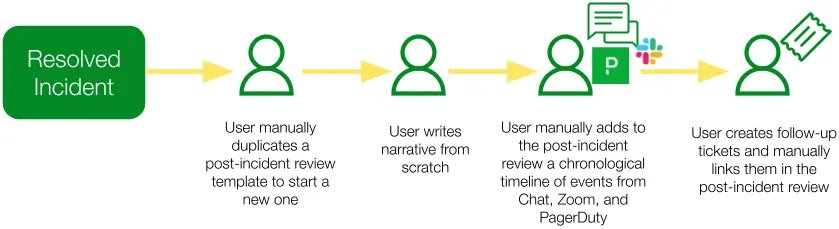
Post-incident review documents were manually created, with event timelines and tickets manually added or linked to the review.
Pain Points
Low Post-Incident Review Completion
PagerDuty was only completing post-incident reviews on 38% of incidents resulting in lower learnings from incidents.
Manual toil
Responders manually copy-pasted timeline events from PagerDuty incidents and Chat channels to build out a comprehensive timeline of events for post-incident analysis.
Increased time spent on post-incident reviews
Engineerings uses PagerDuty's native Post-Incident Reviews (PIRs) for major incident analysis leveraging PD Advance to draft context and polling PagerDuty to copy incident timeline data automatically
The Solution
What They Did
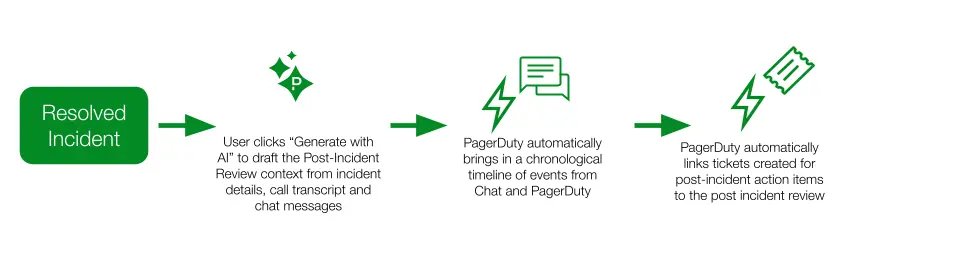
Implemented incident workflows to automatically create a post-incident review upon incident resolution and set completion deadlines. Integrated post-incident reviews with Chat and PagerDuty to automatically build a timeline of events for analysis.
Integrated post-incident reviews with ticketing tool to automatically link tickets to post-incident reviews
Enabled PagerDuty Advance to Scribe incident calls and auto-generate draft post incident reviews based on Scribe, Chat, and Incident context
The Results
How They Are Now Working
The Investigator uses the draft to guide their investigation and makes edits as needed.
- Investigator clicks a “Generate with AI” button the incident review on the post-incident review to automatically draft a review based on incident updates and Scribe Agent context of chat and call.
- PagerDuty automatically drafts a post incident review, timeline, and follow-up action items
Testimonials
On even a simple incident, I would have spent four hours gathering context for the post-incident review. With PD Post-Incident Reviews, it was: click the button and look back at it in 10 minutes. There is so much time in gathering and re-gathering that context in the aftermath of an incident.
— Engineer, PagerDuty
Wins
Improved Completion Rate
post-incident review completion increased from 38% to 100% on major incidents.
Time Saved
estimated 4,872 hours saved annually, equivalent to 2.4 FTEs without additional hiring.
PIR drafting time reduced 60-75%
investigators previously spent 4+ hours manually gathering incident context and up to 1.5 business days completing a full draft. With the built-in PIR automatically pulling in all data and PD Advance drafting the narrative, the same work now takes approximately 10 minutes to generate and around 3 hours to review and finalize.
Outcomes
Reduced manual work and increased time for innovation
less time assembling post-incident reviews means more time on feature development.
Lessons Learned & Tips
- Create a group of champions who advocate for the post-incident review process and guide teams on how to complete post-incident reviews properly
- Run reports to hold teams accountable to follow-up action items tracked in ticketing systems
- Use the "Generate with AI" button in PD Advance to accelerate PIR drafting - treat the AI-generated draft as a starting point for deeper analysis, not a finished report. The PIR brings in the data; the investigator brings the insight.
Ready to transform your post-incident review process?
Start your free trial today and see the difference.
Start Free Trial