Dutonian Story
Notifications Management automates the process of diagnosing DLQ alerts
Learn how one team eliminated manual steps and improved work-life balance by automating DLQ message retrieval through incident workflows and AWS Lambda integration.
- PagerDuty /
- Ops Guides /
- Using PD /
- Notifications Management Team
The Challenge
How They Were Working
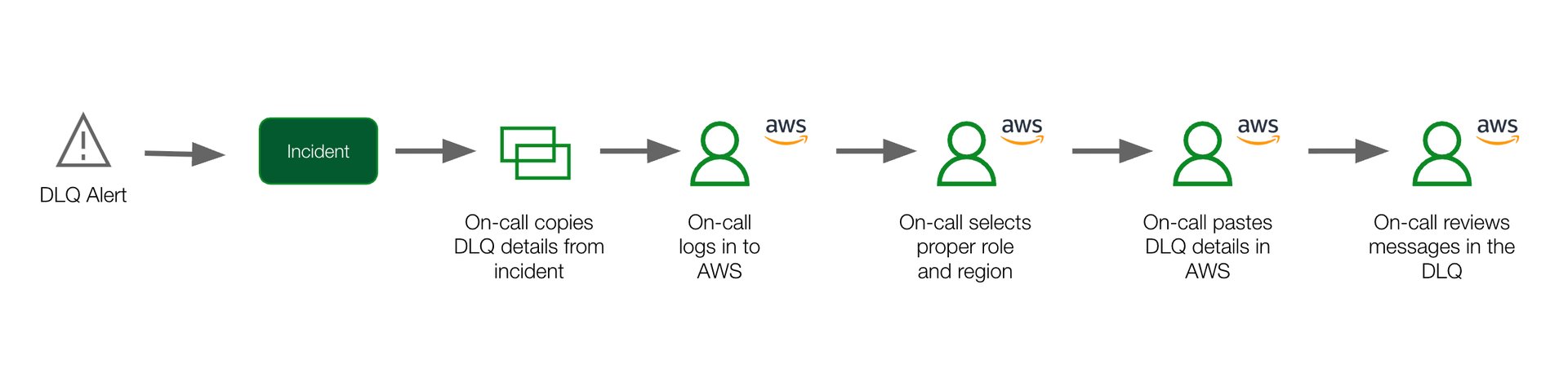
The Notifications Management team relied on a manual, multi-step process to diagnose DLQ (Dead Letter Queue) alerts. The on-call engineer had to log in to AWS, navigate through multiple screens, and manually retrieve message details to understand and diagnose incidents.
Pain Points
Manual toil
Multiple manual steps had to be executed by the on-call to reach the information they needed to diagnose the pain.
Reduced work-life balance
The person on-call was required to be at their laptop to log in to AWS, causing disruption to those on-call during the evenings.
Less time spent on higher priority work
The time spent manually retrieving DLQ messages distracted the on-call from focusing on high priority work and projects.
Key Challenge
Responding to repetitive alerts with repetitive diagnostic steps without taking time away from on-call engineers.
The Solution
What They Did
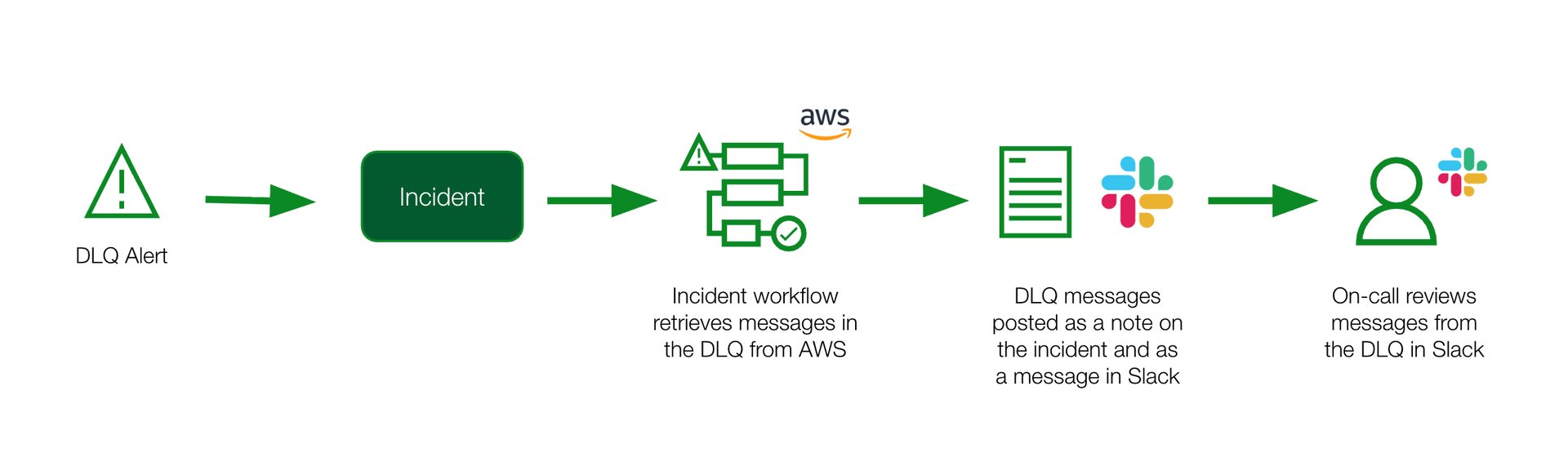
Create an AWS Lambda function that retrieves DLQ messages
Create an incident workflow that:
- Triggers based on the title of the incident on a specific service
- Invokes an AWS Lambda function
- Uses JavaScript to format the Lambda function response
- Send a POST API request to add the formatted response as a note on the incident
Configure the Slack integration to post incident notes to a Slack channel
The Results
How They're Working Now
Wins
Reduced manual toil
The on-call spends less time following manual steps to retrieve message details to diagnose the incident.
Improved work-life balance
The on-call can quickly and easily retrieve DLQ messages from the PD or Slack app without needing to be on their laptop.
More time spent on higher value work
With less time spent on manual work, the on-call is able to focus more time on higher priority incidents and projects.
Outcomes
Eliminated manual steps
Reduced from 6-8 manual steps down to 0 steps through automation.
Faster diagnosis
Instant access to DLQ messages directly in PagerDuty and Slack.
Improved on-call experience
Better work-life balance with mobile access to diagnostic information.
Lessons Learned & Tips
- Use Dev/QA tools to write code before implementing in production
- Test code in a sandbox environment to ensure it works as expected before rolling out to the team
Ready to automate your incident diagnosis workflow?
Start your free trial today and see the difference.
Start Free Trial