
- PagerDuty /
- Engineering Blog /
- Right Tool, Wrong Arguments: Restructuring PagerDuty’s MCP Catalogue
Engineering Blog
Right Tool, Wrong Arguments: Restructuring PagerDuty’s MCP Catalogue
by PagerDuty Engineering
November 24, 2026
| 17 min read
PagerDuty’s MCP server lets AI agents work with incidents, schedules, services, and on-call data. It started with fewer than 20 tools (Côrte-Real, 2025). Over the past year, it grew threefold, including AI capabilities such as blast-radius analysis, post-incident reviews (Hidalgo Moreno, 2026), and Paige, PagerDuty’s SRE Agent (PagerDuty, n.d.-b), exposed as tools. As the catalogue grew, the hard problem shifted from exposing capabilities to helping a model use them correctly, and that depends on a model the server can’t see.
We ran 1,050 evals across eight models from older, weaker ones to the current frontier, focusing on one everyday question, “Who’s on call for my team?”, because it surfaced every failure type we found. We encountered a variety of issues: some models recovered through costlier routes, some asked follow-up questions, and the worst gave confident wrong answers. In almost every failure, they had picked the right tool and then used it wrongly.
Our approach to address these issues was two-fold: we updated the tools using a more accurate description of all arguments; and we regrouped the tools into 18 domains to make the route easier to find and avoid issues related to multi-step routing.
This post describes how we found those failures across models, how we changed the catalogue to prevent them, and what it cost, in terms of tokens and in new failure types.
How we tested
To understand how different models work with our MCP, we ran 1,050 evals against our own production PagerDuty data. We found that the same model doesn’t always take the same path, and that different models have significantly different failure rates.
What the failure clusters showed
Grouping the failed runs by cause gave three clusters.
The unfiltered on-call lookup. list_oncalls Filters by escalation policy, schedule, user, or service, but not by team. Answering “Who’s on call for my team?” therefore takes three steps:
get_user_data()                         → user's teams
list_escalation_policies(team_ids=…)    → those teams' policies
list_oncalls(escalation_policy_ids=…)   → the answer
Models that plan, such as gpt-6.1-sol and gpt-5.6-terra with reasoning on, found this route. Weaker models, such as gpt-4.1 and Claude Haiku 4.5, skipped the middle step and called list_oncalls() with no filter. That returns the first 100 on-call entries across the whole account, around 10k tokens, with truncated: true, meaning more results are on later pages. Each entry names a person, schedule, and policy, but not a team, so the model can’t narrow the list to the user’s teams. gpt-4.1 usually asked which team we meant; Haiku 4.5 often presented the whole team as on-call. Some more capable models, gpt-6-luna and Claude Haiku 5.5, made the same first call, noticed the result was unusable, and went back through policies. They got the right answer, but at the cost of burning more tokens. For gpt-6-luna, this was about 124k against 73k when it did not make this mistake, for Haiku 5.5, it was 421k against 126–134k.
Wrong arguments. Some models found the right tool but got the arguments wrong. For example, gpt-5.4 put the team name into a free-text search field of service name, because the field’s description didn’t specify what entity the name referred to.
Filters silently ignored. Models sometimes send team_ids to list_oncalls, which have no such field. When this happens, the server dropped the unknown field and returned the unfiltered account-wide page, yet the model assumed it was filtered. The impact: gpt-5.4 answered confidently that the whole team was on-call.
What we rarely saw was a model choosing the wrong tool. Across 64 tools, many with similar names, selection was almost always right. The failures came after selection: in the arguments, and in the route between tools.
From the results above, we can see a simple question, “Who’s on call for my team?” hides multiple distinct failure types. Even frontier models sometimes asked a question instead of answering, or took a wrong path before recovering. The other questions in the study followed the same pattern: each surfaced its own edge cases, and the clusters above recurred across them.
Fixing the tools
Each of these points at something in the tools themselves: a description that doesn’t say what the tool returns, an argument that doesn’t say what it accepts, a server that accepts filters it doesn’t have, and a trajectory required to answer a question whose steps are scattered across the catalogue. We first improved our existing tools with better descriptions and schemas, and later regrouped the 64 tools into 18 so the steps of a route sit in one place.
Describe what each tool returns
We rewrote each description to say what the tool returns, and which tool to use instead:
| Tool | Before | After (excerpt) |
|---|---|---|
list_oncalls |
List on-call schedules with optional filtering. | Who is on call: which user currently covers each escalation level… Not a list of schedules: use list_schedules for those. |
list_team_members |
List members of a team. | The people on one team, with each member’s role… This is membership, not who is on call right now; for that use list_oncalls. |
We also found that the “optional filtering” wording in the initial description actually discouraged the models from using these filters. Removing it pushed models towards filtering across the board.
Wrongly interpreted arguments
Some models found the right tool and filled it in wrongly. We saw two forms.
Multiple paths, wrong entity name
“Which services does the SRE team own?” names a team; the service filter wants a team ID; so the route is two steps.
list_teams(query="SRE")             → {"id": "P9OX0LT", "name": "SRE", …}
list_services(team_ids=["P9OX0LT"]) → the team's services
The problem was the alternative path presented by the tool, it is designed to search for services by name using free text with the parameter query. LLMs used that parameter, assuming it could be used to search by team name.
list_services(query="SRE") → []This produced no error, only an empty list. Presented with two options, one of them is the wrong path, gpt-5.4 would often try the one resulting in a failed attempt, and then pivot to the first alternative.
Inspecting our tool description:
"""List all services
args:
    query: Filter by name
    team_ids: Filter by team ids
Nothing says what the name is, so a model, equipped with the team’s name, tried its best to get list services by searching using that name. Rewriting the descriptions to be more explicit fixed the issue:
"""List all services
args:
    query: Filter by service name. Matches service names only, never team names: to get the services a team owns, pass team_ids instead.
    team_ids: Team IDs (e.g. 'P9OX0LT'), not team names. Returns only the services that belong to these teams.
A page size that cuts off the answer
“Who is on call for my team?” can be answered using an alternative path:
get_user_data()              → team IDs
list_schedules(team_ids=…)   → the teams' schedules
list_oncalls(schedule_ids=…) → who is on call on them
In this route, the models have to get the schedules per team and see who is on call for each of those schedules. We encountered a failure mode with our list_schedules limit filter.
list_schedules
  ... description...
args:
   ...
   limit Maximum number of results to return integer, 1–100, default 100
In the first call, the model would use the default limit of 100 and get 5 schedules. It would then assume that limit=5 is enough for most teams, so on the second fetch it overrode the limit argument.
get_user_data()                       → team IDs
list_schedules(team_ids=…, limit=5)   → the team has 6 schedules - 1 is missing in response
list_oncalls(schedule_ids=…)          → who is on call on them
The model would then ignore the truncated=true and listed on calls with incomplete schedules results.
The fix is to describe the consequence on the field. limit: “Leave unset. A lower value drops records; when truncated is true, call again with offset before answering”, and explain to the model how to call other fields in a specific scenario. Additionally, the server can append a response to the model saying explicitly that results were truncated, encouraging the model to fetch the rest of the paginated data.
Filters silently ignored
gpt-5.4 occasionally sent this request:
list_oncalls(team_ids="PZJVLSX")But list_oncalls has no team_ids field, so our server dropped the field and returned the whole on-calls list. The model would then assume those are on calls for the team it is asking for, and would give a confidently wrong answer.
We cannot control what arguments the model would provide, so our approach is to fail loudly and let the model recover. Our tool models used Pydantic’s default extra="ignore", which drops fields it doesn’t recognise. We switched to extra="forbid", so a filter that doesn’t exist returns a validation error the model can act on instead of the wrong data. In clients such as Claude Code and Codex, that error goes back to the model, and it retries in the same turn.
Restructure where a route needs a bridge
“Who is on call for my team?” matches list_oncalls description, so the model goes straight into this tool. It also has the team_ids it got from get_user_data. That call now fails loudly, as designed above. From there, it did one of two things:
- List on calls without a filter and drown in the whole company on calls data
- Pivot to
get_team(team_id)hoping to get on-call data.
This behavior shows up in gpt-4.1 and gpt-6-luna, gpt-5.6-terra, and claude-haiku-5-5. The difference is what happens next. gpt-4.1 fails with either a wrong answer or follow-up questions. The newer models recover by taking another path. Some of the routes we observed:
Check on calls by user
1. get_user_data()
2. list_team_members("PDZJCF9") …        → member IDs
3. list_oncalls(user_ids=[…members…])    → which of them is on call
Check on calls by escalation policies
1. get_user_data()                                   → 2 teams
2. list_oncalls()                                    → 100 account-wide entries, truncated
3. list_escalation_policies(team_ids=[two teams])
4. list_oncalls(escalation_policy_ids=["PUYRBQE"])
5. list_oncalls(escalation_policy_ids=["P4V1JMW"])
Check on calls by services
1. get_user_data()                          → 3 teams
2. list_schedules(team_ids=[all three])     → []
3. list_oncalls()                           → account-wide page
4. list_services(teams_ids=[all three])
5. list_oncalls(service_ids=[…])            → correct answer
When a model recovers, the detour shows up as cost, and sometimes they attempt more than one path in parallel. Claude Haiku 5.5’s one detour (unfiltered on-call, then policies, then services, then the filtered call) was correct at 421k tokens, three times its other runs. Luna’s recoveries ran 1.7× its median.
The fixes so far change what a tool says and what it accepts. This problem is about how tools are arranged. Previous work in the MCP community on that question covers how models access tools: server-side search, tool groups, gateways, and code mode (Anthropic, n.d.; Docker, n.d.; FastMCP, n.d.-a, n.d.-b; GitHub, n.d.; Jones & Kelly, 2025; Varda & Pai, 2025). Research has also shown that merging redundant tools improves tool selection (Liu et al., 2025).
These approaches change how a model reaches or chooses a tool, and our models were already choosing correctly. Search or tool groups would still return an on-call tool with no team filter; a gateway puts the same tools behind one more hop; code mode runs the same wrong route written as code.
Another option is a workflow tool that does the orchestration in code: a single get_who_is_on_call that runs the whole sequence and returns the answer (Schmid, 2026). We chose a middle ground for flexibility. Group the related operations into one tool, but leave the order of calls to the model.
In a catalogue of one tool per endpoint, the steps of a common question are scattered: finding a team’s schedules and finding who’s on call for them were separate tools, and nothing connected them. We regrouped the 64 tools into 18, browse_<domain> for reads and manage_<domain> for writes, with the operation as an action argument (Doriku, 2026; HenkDz, n.d.).
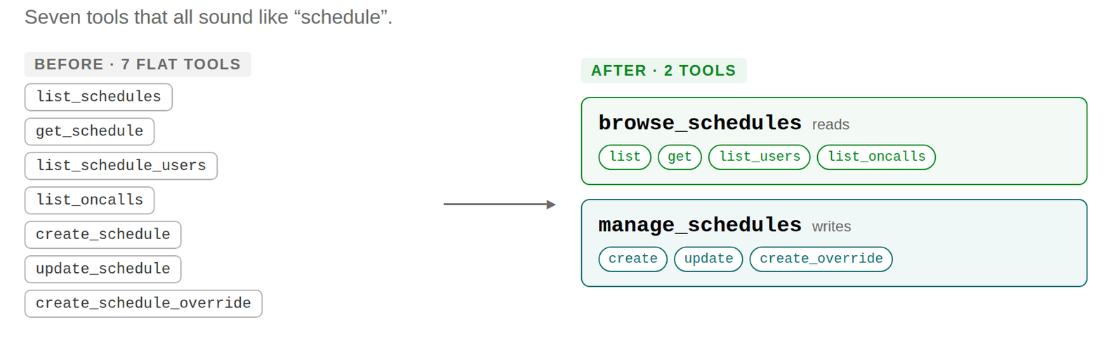
Seven schedule tools became browse_schedules (list, get, list_users, list_oncalls) and manage_schedules (create, update, create_override).
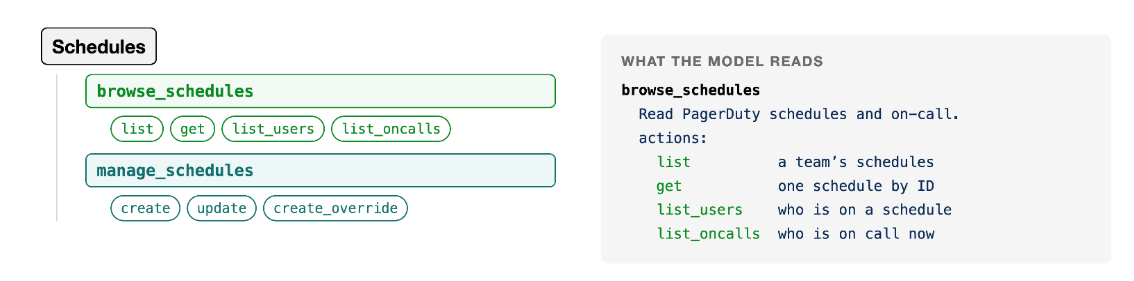
The tool’s schema shows its actions side by side:
browse_schedules (action=[list|get|list_users|list_oncalls])
  list          (query, team_ids, user_ids, …)   ← a team filter
  get           (schedule_id)
  list_users    (schedule_id)
  list_oncalls  (user_ids, escalation_policy_ids, schedule_ids, service_ids, …)
The team filters on schedules, and the on-call lookup now sits in the same tool, so the bridge between them is one hop away. On the restructured catalogue, gpt-4.1 took that route, browse_schedules.list(team_ids) then list_oncalls(schedule_ids)most of the time, and every run reached an answer. Frontier models gpt-6-luna, gpt-5.6-terra statistically took fewer detours as well. This is the one effect descriptions alone didn’t produce. The price is a new required argument: action selects the operation, and a model that omits it gets a validation error instead of a result.
Results
Across the study, we ran 1,050 evals: eight models, both catalogues, several questions, over eighteen different days. The table below lists each failure type we found, which models showed it, what it did to the answer, and what fixed it.
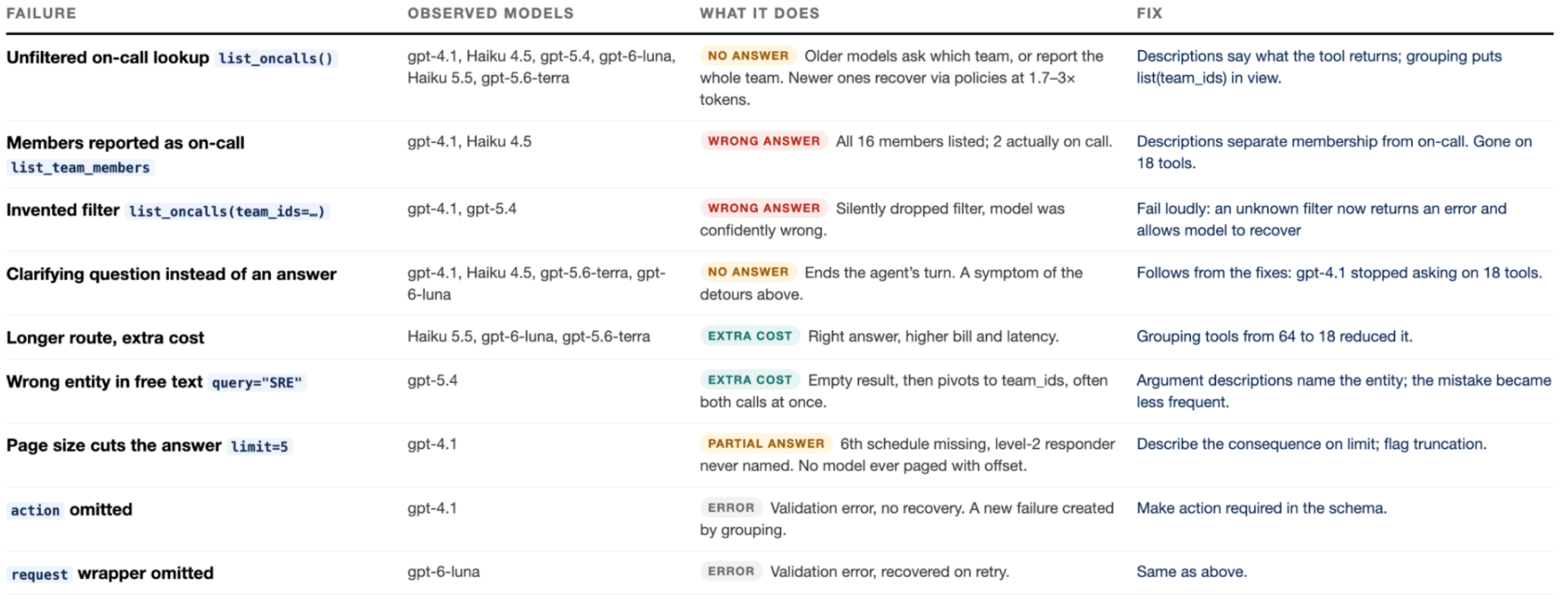
Three of the nine are wrong or partial answers, two are no answer, two are cost, and two are new validation errors that only the restructured catalogue can produce. The silently dropped filter was the main cause for a confident wrong answer with nothing in the transcript to signal it, and that one was a server bug rather than a model one.
What we learned
We measured the steps in the order we shipped them: tool descriptions first, then argument descriptions and strict validation, all on the unchanged 64 tools, and only then the regrouping into 18.
Typing and describing the arguments helped every model we measured, in two ways. For gpt-4.1 it was the difference between giving up and answering: it stopped listing all 16 members of a team as on-call when two were, and stopped presenting a limit=5 pages from six schedules as complete. For gpt-6-luna, which was already right, it was consistency: fewer routes and fewer calls per answer.
Regrouping tools moved related actions closer in the context, allowing models to have a more consistent course correction/trajectory recovery. Models that could already plan paid for confusion in tokens rather than wrong answers: gpt-6-luna’s detours ran 124k tokens against its usual 73k, and Claude Haiku 5.5’s single detour cost 421k against 126–134k, three times its other runs.
What it cost
The nested schemas are larger, so every call carries more tokens. Schema tokens rose from 20,444 to 27,560, about 7,000 more on every call, and tokens per run rose on every model we tested. That’s the price of a steady state: every answer costs a little more. The alternative is paying at the edges. One avoided detour of the kind Haiku 5.5 took saves roughly 290k tokens, the cost of the larger schema across several dozen calls. We chose to pay a predictable premium per call rather than an occasional large one per detour.
New failure types
The structure that made the route visible also added a layer that models could get wrong. gpt-4.1 sometimes left out the action argument, and gpt-6-luna dropped the request wrapper entirely, failures that can’t happen with flat tools. We fail loud when this happens, and the model has better context to make the next choice.
Looking ahead
Evals will keep telling us where models fail and can’t recover. So far, those failures have been fixable with better descriptions, stricter arguments, or grouping related actions.
Regrouping might stop working in a few future directions. Consider the question “Who is on call for the service behind this incident?”. It crosses incidents, services, teams, and on-call. No grouping will put all of that one hop away. For routes like that, a workflow tool might be better suited.
At 64 tools, models found the right tool even among similar names. We don’t expect that to hold at 100+. When selection becomes a failure, tool search and similar approaches may become the right fix, and our evals will tell us when that happens.
Until then, the lesson from 64 tools holds. Models rarely picked the wrong tool; they picked the right one and used it wrongly. So describe what every argument accepts, fail loudly on what you don’t recognise, and keep the steps of a common route in one place.
About the authors:
Viktor is a Senior Software Engineer at PagerDuty, where he builds AI systems and scalable backend infrastructure. With a full-stack background ranging from fast-paced product teams to major enterprises like Sky and NBCUniversal, he specializes in Python, AWS deployment, and AI application development using frameworks like LangGraph.
Ralph Bird is a Principal ML Engineer at PagerDuty, focused on AI agents, LLM observability, and production-grade AI systems. Previously an astrophysics researcher at and a nuclear safety engineer at , he now builds autonomous AI systems for high-stakes incident response and reliability workflows. Ralph combines deep technical expertise across machine learning, distributed systems, and software architecture with a strong background in research and engineering leadership.
References
- Anthropic. (n.d.). Tool search tool. Claude Platform documentation. https://platform.claude.com/docs/en/agents-and-tools/tool-use/tool-search-tool
- Côrte-Real, J. (2025). Lessons learned while building PagerDuty’s MCP server. PagerDuty Engineering Blog. https://www.pagerduty.com/eng/lessons-learned-while-building-pagerduty-mcp-server/
- Docker. (n.d.). MCP Gateway. Docker documentation. https://docs.docker.com/ai/mcp-catalog-and-toolkit/mcp-gateway/
- Doriku. (2026). We collapsed 76 MCP tools into 12 — and cut per-session context cost by 60%. DEV Community. https://dev.to/dorikuio/we-collapsed-76-mcp-tools-into-12-and-cut-per-session-context-cost-by-60-do
- FastMCP. (n.d.-a). Code mode. FastMCP documentation. https://gofastmcp.com/servers/transforms/code-mode
- FastMCP. (n.d.-b). Tool search. FastMCP documentation. https://gofastmcp.com/servers/transforms/tool-search
- GitHub. (n.d.). Configuring toolsets for the GitHub MCP server. GitHub Docs. https://docs.github.com/en/copilot/how-tos/provide-context/use-mcp/configure-toolsets
- HenkDz. (n.d.). PostgreSQL MCP server: Consolidation progress. Glama. https://glama.ai/mcp/servers/@HenkDz/postgresql-mcp-server/blob/main/CONSOLIDATION_PROGRESS.md
- Hidalgo Moreno, A. (2026). Investigate smarter from any agent: Blast radius and AI post-incident reviews come to the PagerDuty MCP server. PagerDuty Blog. https://www.pagerduty.com/blog/ai/mcp-server-intelligent-tools/
- Jones, A., & Kelly, C. (2025). Code execution with MCP: Building more efficient agents. Anthropic Engineering. https://www.anthropic.com/research/code-execution-with-mcp
- Liu, M. M., Garcia, D., Parllaku, F., Upadhyay, V., Shah, S. F. A., & Roth, D. (2025). ToolScope: Enhancing LLM agent tool use through tool merging and context-aware filtering. arXiv. https://arxiv.org/abs/2510.20036
- Outflank. (2026). MCP beyond the spec: Inside Codex and Claude Code. Outflank Blog. https://www.outflank.nl/blog/2026/09/30/mcp-design/
- Schmid, P. (2026, January 21). MCP is not the problem, it’s your server: Best practices for building MCP servers. philschmid.de. https://www.philschmid.de/mcp-best-practices
- PagerDuty. (n.d.). PagerDuty MCP server. PagerDuty Knowledge Base. https://support.pagerduty.com/main/docs/pagerduty-mcp-server
- PagerDuty. (n.d.-b). Paige, PagerDuty’s SRE Agent. PagerDuty. https://www.pagerduty.com/platform/ai-agents/sre/
- Varda, K., & Pai, S. (2025). Code Mode: The better way to use MCP. The Cloudflare Blog. https://blog.cloudflare.com/code-mode/