- PagerDuty /
- Blog /
- Incident Management & Response /
- Bring Your Backstage Context Into Every PagerDuty Incident
Blog
Bring Your Backstage Context Into Every PagerDuty Incident
by Aatharsha Jeyachelvan
August 5, 2026
| 4 min read
This blog post is part of PagerDuty’s ongoing series on how we’re helping customers navigate their journey towards autonomous operations. Read on to learn about how Custom Field Mapping for PagerDuty’s plugin for both Spotify for Backstage and Spotify Portal for Backstage now generally available builds towards this vision.
It’s 2am. A Sev-1 fires, and your on-call responder opens the incident in PagerDuty. What’s waiting for them? A service name, and not much else. No tier. No owner. No runbook, no repo link.
All of that context already exists. It’s sitting in your Backstage catalog, carefully maintained, exactly where it should be. It just never made the trip into PagerDuty. So instead of working the problem, your responder is over in Slack asking “how bad is this actually?” and “wait, where’s the code for this?” The data was there the whole time. It just wasn’t where the work was happening, and that gap costs you minutes in the one moment where minutes count.
If you run on-call, you’re familiar with this gap. Today we’re closing it with PagerDuty’s new Custom Field Mapping Capability.
Announcing Custom Field Mapping for PagerDuty’s plugin for Backstage
Custom Field Mapping pulls the metadata from your Backstage catalog straight into PagerDuty as custom fields, and keeps it current with a continuous sync. No manual entry. No stale data. No spreadsheet of mappings that rots the week after you build it. The idea is simple. The catalog is where your service knowledge lives. PagerDuty is where you respond. Custom Field Mapping connects the two so the responder doesn’t have to.
Earlier this year we automated the connection between PagerDuty services and Backstage components with intelligent service mapping. Custom Field Mapping is the next step: once those services are connected, this is what fills them with everything a responder needs.
What you can bring over
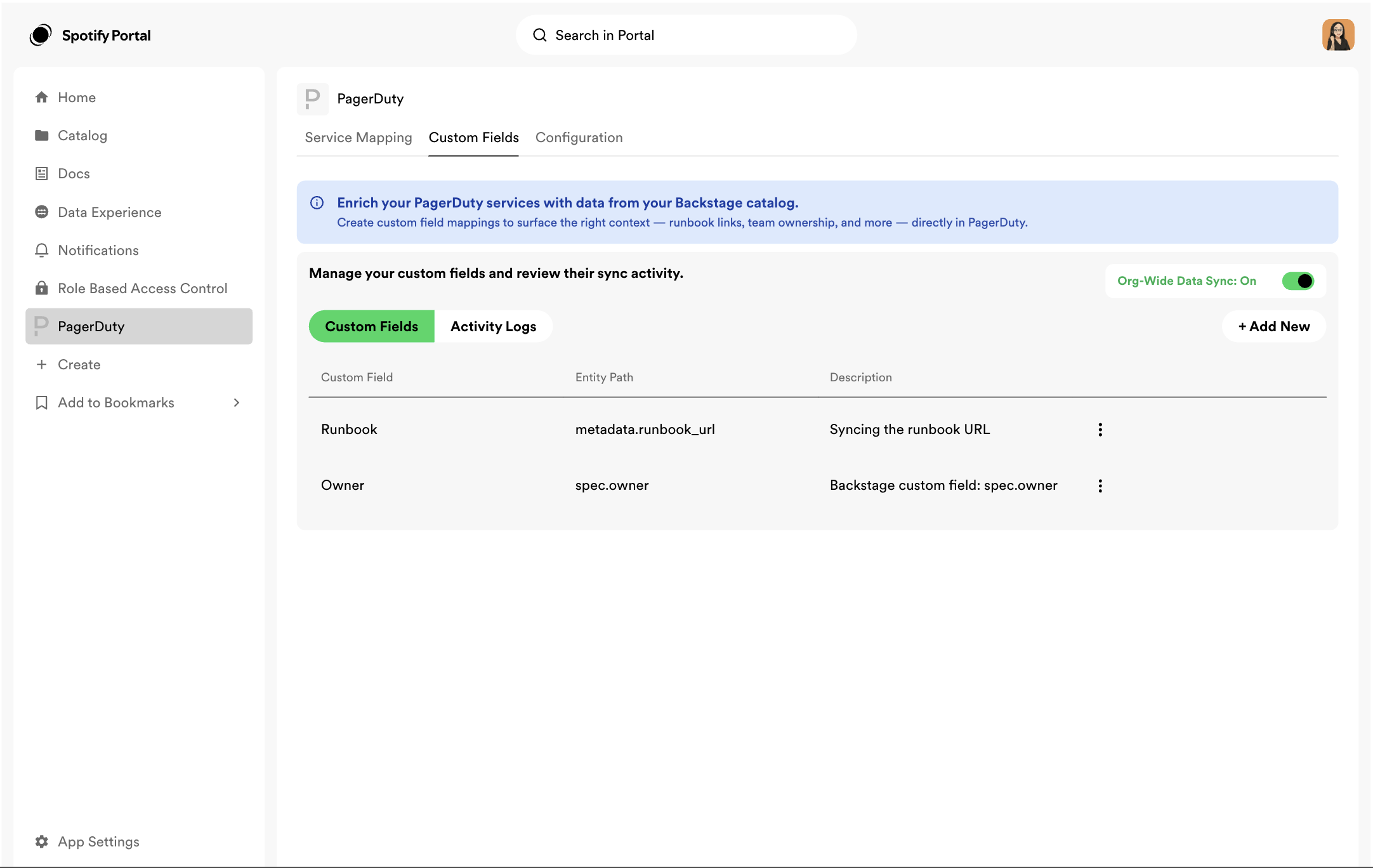
Setup happens in the plugin, in a new tab called Custom Fields. This is where you decide which pieces of your Backstage catalog show up in PagerDuty.
Each field takes two inputs: the label your responders will see, and the Backstage metadata path the value comes from. Point, sync, done. Common examples include:
- Tier: route and escalate based on how critical the service is
- Ownership: know who is responsible the second an incident opens
- Runbook links: put the fix one click away instead of one search away
- Repository and dependencies: give responders the full shape of the service at a glance
Because the values are real structured metadata and not static labels, they do more than display. Teams can route and escalate on tier, filter and search on synced tags, and roll the same fields into reporting. And because the sync is continuous, the values stay current as your catalog changes. The operational picture you maintain in Backstage now shapes how incidents are handled and measured in PagerDuty.
You stay in control
Automation should never take the pen out of your hand. Every mapped field can be disabled or deleted, and the two behave differently by design. Disable a field and its sync pauses while the current value stays put, which is what you want when you need to stop updates without losing data. Delete a field and it is removed from both Backstage and PagerDuty. That clear line lets platform teams govern their mappings with confidence as the catalog evolves.
Paving the path to autonomous operations
Every incident your team responds to carries signal, and full context is what lets you act on it. That standardized, consistent metadata also powers smarter routing, sharper prioritization, and reporting you can trust across every service you own. Over time the pattern compounds: the data you already have turns into faster resolution today, and the foundation for prevention tomorrow.
That is what autonomous operations looks like in practice. Not a far-off promise, but the data you already have turned into faster resolution today, and the foundation for prevention tomorrow. Every incident that opens with full context resolves a little faster, and that context feeds the next one.
Custom Field Mapping for PagerDuty’s plugin for Spotify for Backstage and Spotify Portal for Backstage is generally available today for all PagerDuty customers using Spotify for Backstage or Spotify Portal for Backstage.
Learn more at pagerduty.com/integrations/backstage, read our knowledge base, or connect with your PagerDuty account team.