- PagerDuty /
- Blog /
- Incident Management & Response /
- PagerDuty’s Slack App Just Got a Whole Lot Better (And We’re Just Getting Started)
Blog
PagerDuty’s Slack App Just Got a Whole Lot Better (And We’re Just Getting Started)
by Cristina Dias
February 25, 2026
| 8 min read
If you’ve been eyeing chat-native incident tools and wondering whether PagerDuty can compete in Slack, this one’s for you.
Are you still treating your incident management platform like a glorified pager? It’s time for an update. Over the past months, we’ve been evolving our Slack app from a notification tool into a full incident command center, and we’re coming for the chat-native tools (ahem, incident.io). While they position Slack as the center of your incident universe, we see it differently: Slack should be an excellent interface into a platform that does far more than manage incidents in chat.
Here’s what separates a chat tool from an incident management platform: the depth of what happens before, during, and after the chat. Chat-native tools excel at incident response, from spinning up channels to summarizing discussions and capturing timelines. PagerDuty orchestrates your entire incident response ecosystem, from monitoring tools, ticketing systems, on-call schedules, status pages, comprehensive post-incident reviews, and yes, Slack, into one coordinated workflow.
And here’s the optionality advantage: PagerDuty gives you multiple paths to incident resolution: mobile app, web console, phone bridge, API, status pages, Microsoft Teams. Not redundancy for its own sake, but resilience. When Slack goes down (and it does), or your company adopts a new chat platform, or your on-call responder is offline, incident management doesn’t grind to a halt. Incidents don’t wait for your preferred interface to come back online.
Here’s what’s launching today, what we shipped last year, and what you can already do right now.
Your Slack Experience Just Got Cleaner
Starting today, customers will start seeing the first wave of our Slack transformation. Here’s what’s new:
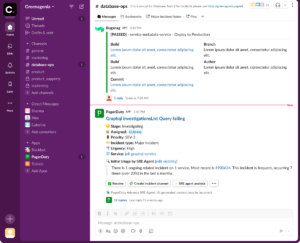
New Incident Card
We’ve streamlined incident cards to show only what matters, with clearer visual hierarchy and inline action buttons. Information density and action speed are the focus. This means no unnecessary text, buttons, or emoji reactions cluttering up your incident channels. Available to all PagerDuty customers using the Slack integration.
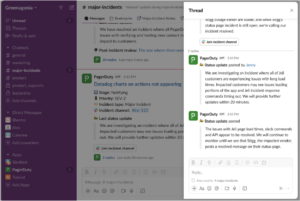
Threaded Activity Updates
Incident activity now appears in threads instead of flooding your channel. When you’ve got three SEV-2s and a SEV-1 all active at once, threaded updates keep each incident’s context contained instead of creating a chaotic firehose. Available to all PagerDuty customers using the Slack integration. Should you not want to use threaded updates, refer to our Opt-Out of Threaded Updates section in our user guide.
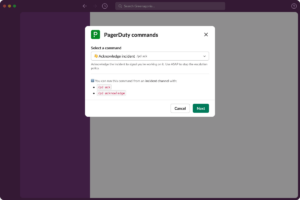
Slash Commands Made Easy
The new modal gives you a searchable interface to find the right command quickly, making command discoverability effortless. Available to all PagerDuty customers using the Slack integration.
The 2025 Recap: The Year AI Joined Your Incident Command Center
For PagerDuty, last year was all about bringing AI into the full incident lifecycle, right from Slack: not just for summaries after the fact, but for active response and prevention. Let’s recap all the innovations we’ve shipped.
Four AI Agents That Actually Do The Work
Our suite of AI agents (Scribe Agent, Shift Agent, Insights Agent, and SRE Agent) works directly in Slack, alongside PagerDuty Advance’s AI Assistant. Our AI pulls data from your monitoring tools, ticketing systems, on-call schedules, historical incident data, and even from your Amazon Q Business connected applications to drive faster action and unlock richer operational intelligence. Available with PagerDuty Advance.
Slack Work Objects Make Incident Previews Easier
When someone shares an incident link in Slack, you see severity, status, assigned responders, and affected services right inline. Perfect for stakeholders like executives who need a bird’s-eye view of the issue without diving into the full incident channel. That preview is accurate because PagerDuty is the source of truth, not just one interface among many. Available to all PagerDuty customers using the Slack integration.
Core Incident Management Workflows
We also shipped the workflow improvements you’ve been asking for: Required Fields on Resolve (no more undocumented incident closures), Reopen Incidents (because “resolved” is sometimes wishful thinking), and Renotify Responders (re-alert when the first page gets ignored). Available to all PagerDuty customers.
Top 10 Things You Can Do Right Now in Slack
PagerDuty’s Slack app lets incident responders stay in their flow instead of tab-hopping between tools. But more importantly, it connects your entire incident response ecosystem, from Slack to monitoring tools, ticketing systems, and on-call schedules, into one coordinated workflow.
1. Manage Incident Lifecycle (Trigger, Ack, Resolve)
Type a slash command, select the service, set the severity, and you’re off. The incident gets created in PagerDuty, the right people get paged across whatever channel they prefer, and an incident channel spins up automatically. Your action syncs across all channels so the entire response team sees the same state. Available to all PagerDuty customers.
2. Mobilize Your Team (Add Responders, Reassign)
Loop in additional responders by name, team, or escalation policy without leaving Slack. PagerDuty knows who’s on-call, who has domain expertise, who’s already underwater with other incidents, and who’s on PTO, and intelligently routes based on actual availability and workload, not just @mentions. Available to all PagerDuty customers.
3. Automate with Incident Workflows
Kick off pre-built runbooks that execute automatically when triggered: page the database team, create a Jira ticket, open a Zoom bridge, notify stakeholders, and start a status page incident. PagerDuty orchestrates your entire incident response stack, not just Slack. Available to all PagerDuty paying customers.
4. Assign Incident Roles
Designate an incident commander, scribe, or other critical roles directly in Slack to keep everyone aligned during complex incidents.
5. Query Incident Data Conversationally with AI
Ask questions in natural language: “Show me all SEV-1 incidents from last week” or “Who resolved the database incident yesterday?” PagerDuty Advance AI Assistant returns answers inline, reducing cognitive load during high-stress incidents. Available with PagerDuty Advance.
6. Real-Time Diagnostics from SRE Agent
SRE Agent analyzes incoming alerts, correlates them with historical data, suggests probable root causes, and recommends specific troubleshooting steps, all in Slack. It’s the difference between an incident report that says “the database was down” and an agent that says “this error pattern matches three previous incidents—check connection pool limits first.” Available with PagerDuty Advance.
7. Auto-Transcribe Incident Calls with Scribe Agent
Scribe Agent joins your Zoom, Google Meet, or Microsoft Teams incident calls and transcribes everything in real-time. The transcript gets posted directly into your Slack incident channel, timestamped and searchable, feeding into post-incident reviews automatically without anyone lifting a finger. Available with PagerDuty Advance.
8. Optimize On-Call Schedules with Shift Agent
Shift Agent pings you in Slack when someone’s PTO overlaps with their on-call shift, suggests overrides when workload is unbalanced, and flags when a team member has been on-call too many consecutive weeks. Available with PagerDuty Advance.
9. Fast-Track Your Post-Incident Reviews with Scribe Agent
After an incident closes, Scribe Agent ensures all the context you need is already captured: timeline events, Slack messages, Zoom transcripts, and responder actions. When you’re ready to create your incident retrospective, all that rich data flows directly into the Post-Incident Review workflow, giving you a head start on drafting summaries and identifying action items. Available with PagerDuty Advance.
10. Surface Incident Patterns with Insights Agent
Insights Agent proactively surfaces recommendations like “Your payment service has had 12 incidents in the past 30 days—consider adding automated health checks.” Perfect for SRE leads and platform engineers looking to reduce toil and prevent recurring issues. PagerDuty processes billions of incidents annually, and the AI learns from patterns across the entire ecosystem. Available with PagerDuty Advance.
What’s Next? Even More Ways to Stay in Flow
We’re just getting started. In the coming months, we’re bringing threaded slash commands so context and actions live in the same place, expanded on-call functionality so you can page any person, team, or service directly from Slack without needing an escalation policy, a streamlined incident creation flow (with Quick Declare) that doesn’t require you to pick a service upfront, and a redesigned admin dashboard that makes Slack configuration actually understandable.
And that’s not all, but we’re keeping the rest under wraps for now. Stay tuned!
PagerDuty is the Obvious Choice for Incident Management
If you’re evaluating incident management tools, don’t just compare feature lists. Think about where your operations are headed: more services, more integrations, more complexity, more teams, more channels. Pick the reliable platform that can grow with you, not the point solution you’ll outgrow in 18 months.
PagerDuty’s bet is this: an excellent chat experience that’s backed by a platform with 700+ integrations, multi-channel support, intelligent AI, and 16+ years of incident management expertise. You want the simplicity of chat-native tools with the power and flexibility of a platform.
That’s what we’re building. Start a free trial today.