PagerDuty’s Slack App: New Incident Management Capabilities
by Cristina Dias
May 6, 2026
| 8 min read
[Edited on September 1, 2026 with the latest updates]
Building on progressive updates to our Slack app, teams can now resolve incidents even faster with new updates included below:
- Quick declare of incidents even if not mapped to a service (in rolling GA now)
- One-click post-incident reviews kicked off in Slack (GA)
- Custom incident cards (in Early Access)
- AI-powered incident communications (in Early Access)
This is part of our path to autonomous operations: reducing toil, protecting your capacity, and letting you stay in flow. If you’re only using PagerDuty for on-call scheduling, you’re missing the big picture. These Slack capabilities work best when they’re connected to the rest of the platform: Event Intelligence filtering your alerts, Agents helping provide issue remediation steps, and your entire incident workflow in one chat-based system.
Here’s What We’re Delivering
1. Declare an incident in seconds, even before you know the impacted service
You’ve been there: something is clearly wrong, but you don’t yet know which service or team owns the problem. So you sit in the service picker guessing, or you skip declaring altogether and keep debugging in a shared channel while the clock runs.
Quick declare removes the service requirement. You can get an incident open, pull in responders, and start coordinating right away, then set the impacted service once you know it.
Behind the scenes, an incident declared without a service routes to a built-in Default Mobilization Service that ships with its own escalation policy and schedule, so there’s nothing to set up. It behaves one of two ways:
- Unstaffed (the default): nobody is auto-paged, the person who declared becomes the incident owner, and the incident is auto-acknowledged.
- Staffed with responders (a standing incident-commander rotation, for example): those people are notified immediately as first responders.
Either way, setting the impacted service is the required next step to route the incident to the owning team.
2. Kick off your Post-Incident Review from Slack
The incident is resolved. Everyone leaves the channel. And the post-incident review becomes a blank page in another tool that nobody wants to start, so the hardest-won lessons of the night quietly evaporate.
Now the review starts where the incident happened. The moment an incident resolves, PagerDuty posts a message to the dedicated incident channel with a button to start the PIR, instantiating a new review automatically with context from the channel already in it.
PagerDuty kicks off AI generation in the PIR tab using Scribe’s notes, follow-up messages posted to the channel, and the wider context our Agents have on the incident.
You start it in Slack and finish it in the web UI, where the full review experience lives. No more hunting for the incident record to begin the write-up, and no more reviews that never get written because starting one was too much friction.
3. Build the incident card your responders actually need
Slack incident cards have been static: they surface fields many teams don’t use and leave out the context responders actually want, which sends people back to the web app mid-incident to find it.
Custom fields and custom incident cards give admins a card builder. In Slack Configuration under Integrations, you can customize the card template for each of the three channel types (notification channels, dedicated incident channels, and announcement channels), hide or re-show any of the default system fields, and surface your own custom fields created in the web app, selected by incident type.
4. Draft and publish status updates without leaving the channel
Incident communication is manual and fragmented today. Responders coordinate in Slack, then rewrite the same update for internal and external status pages in separate tools, which delays the first customer post and creates inconsistent messaging across audiences at exactly the wrong moment.
Now you can draft, preview, and publish to PagerDuty external status pages directly from Slack. Type /pd status-page to open the status update modal with an external page already selected. Write the update yourself or start from a template, then set the incident status, add the impacted service, communicate the impact severity, and tell readers when to expect the next update.
That update can also be AI-generated from the incident context, so the first customer post goes out in the time it used to take to open the second tool. Customers stay informed without pulling responders away from mitigation.
You Already Have the Platform, Use All of It
The capabilities above build on a full set of Slack improvements that are already generally available in your account today. If you haven’t tried these yet, this is the place to start.
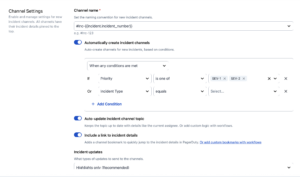
1. Get a dedicated channel for every big incident
You’ve been there: managing an incident in a shared channel while alerts keep coming in, scrolling back through hundreds of messages to find critical updates, watching new responders join and ask “what is happening?” because context is buried.
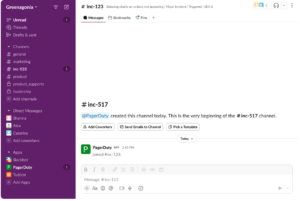
We automate dedicated incident channels to fix this. When you declare an incident or promote an alert, PagerDuty creates a channel (like #inc-1234-database-outage) where:
- All incident activity goes to one place, including timeline, responder actions, status changes, and much more automation
- Mobilization happens faster: new responders see everything in one place, including the incident info pinned
- Your notification channels (for incoming alerts and problems) stay clean
- Post-incident reviews have a complete record
You can control when channels get created. Set it by priority (P1 and P2 only), by incident type, or other options. For major incidents, broadcast status updates to announcement channels while keeping the detailed engineering work in the dedicated channel.
Dedicated incident channels will be enabled by default, but you can customize or opt out at any time. Learn more about why we believe dedicated incident channels are a best practice by reading this blog and watching this short video.
2. Page responders without leaving Slack
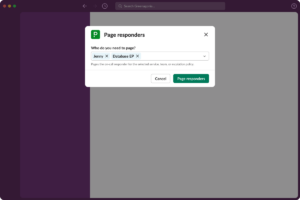
Mid-incident and need the database team? Simply type /pd oncall database to see who’s on-call and page them with one click. They’ll get notified and join the incident channel. You stay in Slack.
Works for any escalation: page a user, a service, or an escalation policy. No more switching to the web console to check schedules or create pages. Additionally, the /pd page command brings up a modal with all on-call information from your escalation policies and more.
3. Manage all Slack settings in one place
If you’ve configured Slack integrations across multiple services and teams, you know the pain: settings scattered everywhere, inconsistent behavior, no clear way to see what’s configured where.
Now, you can just go to Integrations > Slack Configuration to manage:
- When dedicated incident channels get created (priority, service, team)
- Channel naming conventions and defaults
- Notification preferences
- Announcement channel configuration
- Slash command permissions
- Service-specific overrides
Configure once instead of multiple times. No more struggling with multiple settings.
4. Keep responders engaged
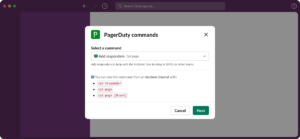
You are commanding an incident and need to check who is involved. Instead of asking in the channel or checking the web console, you can see responders listed directly in the incident card. Some new responder management capabilities include:
Using /pd responders allows you to:
- View responders with acknowledgment status directly in the incident card
- Re-notify responders who missed the initial page
You can re-open resolved incidents with one click and the original channel reactivates with all context.
All managed from Slack, so you stay focused on coordination.
5. Get your team up to speed with onboarding tutorials
In both the PagerDuty platform and inside Slack, we’re making it easier for new users to understand best practices. Tutorials will help users:
- Log in and authenticate the app
- Understand ‘acknowledge’ and ‘create’ incidents
- Learn actions they can take to speed up MTTR
No separate training sessions. No documentation hunting. Your team learns the workflow right when they need it.
And the improvements we delivered earlier this year
These capabilities build on Slack improvements we delivered earlier this year:
- Redesigned incident cards with clear information, updated emojis, and a better hierarchy of information.
- Threaded activity updates that keep incident activity organized and reduce channel noise.
- New intuitive slash commands with a modal that shows available commands and parameters.
But they’re part of something bigger: our path to autonomous operations. Built on 16 years of operational intelligence, PagerDuty is purpose-built for the AI era. Here’s what that means for you:
- Event Intelligence filters and groups your alerts before they hit Slack.
- SRE Agent can triage and fix issues before they page anyone. It runs diagnostics, executes remediation, and works directly in your Slack channels. When an incident does need human attention, the Agent has already done the initial investigation. You can even add SRE Agent directly to schedules and escalation policies as a virtual responder.
- Bring in the right people, leveraging your on-call schedules and escalation policies. The /pd oncall command pulls from your existing schedules. Alert promotion pages the right people based on your escalation policies.
- Shift-left with developer integrations. PagerDuty’s MCP integrations bring operational context directly into tools like Cursor and Claude Code, so developers can build with confidence and prevent incidents before they happen.
When something breaks at 3 AM, you’re not juggling multiple tools or wondering which vendor to call. Everything flows through one system that you already know.
Get started today
Complete incident management in Slack eliminates the context-switching that slows you down during incidents. Manage the full incident lifecycle from Slack and stay focused on resolution. Join the Early Access program.