- PagerDuty /
- Blog /
- Incident Management & Response /
- Activate Your Continuous Learning Flywheel With Post-Incident Reviews in PagerDuty UI
Blog
Activate Your Continuous Learning Flywheel With Post-Incident Reviews in PagerDuty UI
by Cristina Dias
May 6, 2026
| 6 min read
[Edited on September 1, 2026 with the latest updates]
Earlier this year at our H1 2026 launch, we announced PagerDuty’s vision for autonomous operations: a future where AI agents learn from every incident, prevent failures before they happen, and progressively automate so teams can focus on innovation instead of firefighting. At PagerDuty, we have a systematic approach where every incident becomes organizational intelligence that feeds back into your operations, making your systems smarter and more resilient over time.
For years, we’ve been thought leaders in blameless postmortems and Failure Fridays through our Postmortems feature and our Jeli acquisition. We’ve learned a lot from customers, and we’re evolving the post-incident experience to help you break the cycle of repeated incidents, save time, and build more resilient operations. Now, we’re taking the next step on that journey with Post-Incident Reviews in PagerDuty UI, now Generally Available.
Are Your Incident Learnings Getting Lost in the Chaos?
You know that learning from incidents is the only way to improve resilience over time. But we often hear from customers that their teams struggle with completion and follow-through. Post-incident reviews (PIR) get skipped, action items don’t get done, and the same incidents keep happening. Your team burns out and you’re stuck in reactive mode.
- Context-switching loses details. Teams jump between monitoring tools, Slack, ticketing systems, and documentation platforms. By the time someone writes the PIR, critical context has evaporated.
- Manual work takes too long. Writing comprehensive reviews from scratch takes hours that exhausted responders don’t have.
- Insights stay siloed. Even completed PIRs rarely feed back into systems that could prevent future incidents.
The result? Repeated incidents and missed opportunities to build more resilient operations.
The new Post-Incident Reviews, directly available in the PagerDuty UI, solve this by bringing the entire PIR workflow directly into the incident experience.
Capture Learnings Without Leaving PagerDuty
Post-Incident Reviews are built directly into the incident experience in the PagerDuty UI. When your team resolves an incident, whether in Slack or the web interface, a Post-Incident Review can be started immediately, right from PagerDuty, with full incident context already accessible.
What you get:
- Start PIRs from where you work. Kick off a review directly from Slack when you resolve an incident, or from the incident detail page in the web UI. No separate tools or logins required. PIRs are automatically created when an incident is resolved, so your team never has to remember to start one manually.
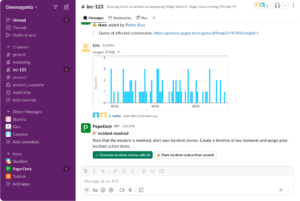
- All context in one place. Every PIR includes the complete incident timeline, responder actions, service information, and alert data. PagerDuty automatically ingests context from Slack conversations, Scribe Agent summaries, and Incident Lifecycle Events (ILE), so everything documented in those locations is already there in the PIR. This means that to generate an initial PIR, there’s no need to hunt through Slack channels, dig through logs, or try to remember who did what. The incident history and context are right there when you open the PIR.
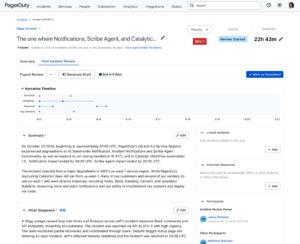
- Real-time collaboration. Multiple team members can work on the same review simultaneously with live cursors showing who’s editing what. No more version conflicts or lost edits, as everyone can see changes as they happen. Whether you’re the incident commander adding the timeline, an engineer documenting the root cause, or a manager reviewing the impact, everyone can contribute at the same time without stepping on each other’s work.
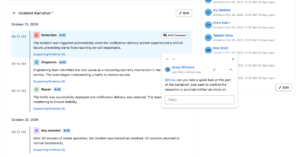
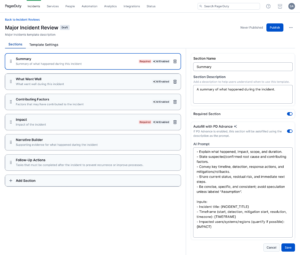
- Structured templates. Guide your team through consistent, thorough analysis with customizable templates that ensure nothing gets missed. Create templates with sections like “What Happened,” “Root Cause,” “Impact,” and “Lessons Learned” to standardize your PIR process across teams. You can customize these to match your organization’s specific needs and ensure every review captures the information that matters most to you.
Instead of treating post-incident reviews as an afterthought, they become a natural part of closing out every incident. When teams can capture learnings immediately without friction, those insights become the fuel that powers smarter operations.
Let AI Do the Heavy Lifting
Post-Incident Reviews now use native AI to automatically draft your PIR content, turning hours of manual work into minutes of refinement.
What’s available now:
- Instant AI-generated drafts. AI automatically generates PIR content (summaries, key timeline moments, root causes, and suggested follow-ups) based on full incident context.
- Automatically-ingested data from Slack, Scribe Agent, and Incident Log Entry events. From the moment you start a PIR, data from your connected tools is ingested and can be used to generate a first draft.
- Collaborate with comments and @mentions. Tag stakeholders, add comments, and refine the narrative together. Keep cross-functional teams aligned on what happened and what needs to happen next.
- Create actionable follow-ups with AI assistance. Our AI-suggested follow-up actions help ensure learnings translate into concrete improvements, tracking accountability and progress to close the loop.
Built for the Way You Work
Post-Incident Reviews in PagerDuty UI integrate seamlessly into your existing workflows:
- Slack-native experience. Start PIRs in Slack with the click of a button, import channel data, and collaborate.
- Web UI for deep analysis. Access the full PIR experience in the PagerDuty web interface with rich-text editing, timeline visualization, and valuable incident context.
- Jira integration. Sync follow-up actions to Jira to track remediation work alongside your existing development workflows.
- API access (coming soon). Programmatically access PIR data to build custom integrations, analytics dashboards, or feed insights into other systems.
- Add attachments for deeper analysis. Upload runbooks, screenshots, logs, or supporting documentation to enrich your PIRs.
- Customize AI prompts. Create account-specific templates with custom AI prompts tailored to your organization’s PIR format. Mark sections as required and control AI generation on a section-by-section basis.
- Feed insights back into SRE Agent memory. PIR learnings automatically feed back into PagerDuty SRE Agent’s memory, improving future incident response and helping developers assess deployment risk to prevent incidents before they occur.
The result is a continuous learning flywheel in action. Comprehensive learnings get captured in minutes instead of hours, feeding intelligence back into your operations to build more resilient operations.
Ready to Get Started?
Post-Incident Reviews in PagerDuty UI are generally available for customers on OpsCloud and Incident Management and CSOps Professional plans and above.
Give it a try today and start turning your incidents into prevention.