
- PagerDuty /
- Blog /
- Best Practices & Insights /
- Custom shifts for one-off requirements or complex schedules
Blog
Custom shifts for one-off requirements or complex schedules
by Mandi Walls
July 21, 2026
| 8 min read
While most on-call schedules are built to represent regular rotations, often on a weekly basis, not all of your on-call needs require the same coverage every week. We’ve added Custom Shifts to the Shift-Based Schedules for maximum flexibility. Custom shifts are a feature of our new Shift-Based Schedules.
With Custom Shifts, your team can cover ad hoc needs for special events, major deploys, Failure Fridays, gamedays, or whatever comes up that needs some extra coverage. You can also build more complex schedules that fit around everyone’s needs using Custom Shifts and the PagerDuty API.
One-off custom shifts
Custom Shifts can be added to any Shift-Based Schedule you already have in your account, or you can create a new schedule made up of custom shifts.
To add a shift to an existing schedule:
- From the “People” menu, select “Schedules”
- Find the schedule you’d like to edit in the list and click on its name. Make sure it is a Shift-Based schedule and not marked “Legacy”
- On the right side of the schedule screen, there is a button for “Create Rotation” with a down-arrow beside it. Click the arrow and select “Create Shift”.
- Fill in the information for your desired shift: Timezone, when the shift will start, when it will end, and the user who will be assigned the new shift.
- Click “Create” at the bottom of the screen.
- Create as many additional shifts you need.
- At the top of the screen, click the “Save Schedule” button to apply the schedule!
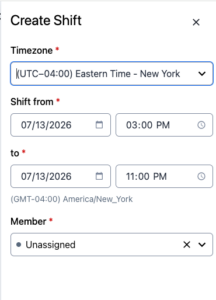
Unlike a rotation, a Custom Shift is created with a single person on-call, so if you need several people added to a custom shift time, add shifts for each responder.

Complex custom shifts using the PagerDuty API
To get started with the PagerDuty API, make sure you have a valid API Key for the REST API. For more information on required headers and other configurations, see the developer documentation.
The PagerDuty REST API communicates via JSON documents. To create new Custom Shifts, you’ll be creating new JSON requests to the API, and the API will return JSON to your code.
The Custom Shifts API endpoints are different from the existing endpoints for the legacy schedules. When building requests for and as part of a Shift-Based Schedule, you’ll use the new v3 API. Each page of the developer docs will show the request URL at the top of the page. For Custom Shifts, that URL will be:
https://api.pagerduty.com/v3/schedules/{id}/custom_shiftsEach object instance in the PagerDuty API has an associated ID. You may have noticed these in the URLs for pages in your PagerDuty account. You can find the ID of the schedule you’d like to update in the URL for that schedule. It will look like:
https://my-account.pagerduty.com/schedules/P******The last part, starting with “P” is the unique identifier for this schedule. You’ll need the ID to make the request: you’ll include it in the request URL as shown above.
The JSON necessary for creating a Custom Shift is fairly simple:
{
  "custom_shifts": [
    {
      "type": "custom_shift",
      "start_time": "2025-03-15T09:00:00Z",
      "end_time": "2025-03-15T17:00:00Z",
      "assignments": [
        {
          "type": "shift_assignment",
          "member": {
            "type": "user_member",
            "user_id": "PUSER123"
          }
        }
      ]
    }
  ]
}
In a single POST request, you can create one or more Custom Shifts via the array labeled “custom_shifts”. Each shift contains a “type”, “start_time”, “end_time”, and an array of one or more “assignments”.
Each “assignment” includes the “user_id” of the user who will be assigned to the shift. User IDs are similar to the IDs for schedules: you can find them from the URLs of the user’s pages in your PagerDuty account. If you’d like to access them more programmatically, check out the documentation for the /users/ endpoint in the REST API.
The “start_time” and “end_time” data is important to note as well. PagerDuty’s REST API requires ISO 8601 time/date format. It will accept a date with no time, but for any entries that will include both the date and a time, you must include a timezone. You can use UTC with the “Z” shortcut as shown in the example, or use an offset based on your timezone. I am currently in America/New York, so my offset is “-04:00”.
When programmatically creating shifts, use a good time library. In Python, for example, we use datetime.
You can build up a single API request to contain multiple shifts in the “custom_shifts” JSON array, and each shift can have multiple “assignments”. How you choose to build the JSON document is up to you and the requirements of your HTTPS library.
I built a helper function to create the JSON for each shift:
def custom_shift(user, start_time, end_time):
    ## schedule_id goes in the url of the call, not in the payload
    json_data = {
      "type": "custom_shift",
      "start_time": start_time,
      "end_time": end_time,
      "assignments": [
        {
          "type": "shift_assignment",
          "member": {
            "type": "user_member",
            "user_id": user
            }
        }
      ]
    }
    return json_data
Since the data required to create a single shift is only three key components – the UserID, start_time, and end_time – you can also create a CSV file for your shifts, and read those into your program. This is especially useful if you are managing shifts in a spreadsheet; export the sheet to CSV and feed it into your program.
For an example of using CSV files with Custom Shifts, my sample code is on Github. I chose to use Python’s CSV library, and the DictReader function to read each line into a dictionary, and create the shifts with that data:
with open(filename, "r") as file:
    file_data = csv.DictReader(file)
        for shift in file_data:
            # user_id, start_date (YYYY-MM-DD), start_time (HH:MM:SS), end_date, end_time
            shift_data["custom_shifts"].append(custom_shift(shift["UserID"], shift["StartTime"], shift["EndTime"]))
    return shift_data
Complex example: DuPont Schedule
A couple of years ago, we had a user ask on the forums about building DuPont schedules in PagerDuty. These are complex schedules:
- 28-day schedule
- Four teams
- A different schedule each week, comprised of day shift, night shift, and off days
- Shifts are 12 hours
In the old schedules, there was no way to do this, but with custom shifts, you can fully build out a DuPont schedule for a set of teams. I have posted an example in my Github account.
As with any Custom Shift, the shifts in a DuPont schedule require the user and the times. For DuPont schedules specifically, though, all of the schedules will have the same times; all the shifts are either day shift of 12 hours or night shift of 12 hours, with no overlap. So one team could be scheduled from 9:00AM to 9:00PM and the next team is on from 9:00PM to 9:00AM the next morning.
Because every week is different, I chose to represent each week as an array of shifts, designated “day”, “night”, or “off”. You could use 0, 1, 2 – or any other combination to represent three different shifts:
# build weeks
# week 1:
week1 = ["night", "night", "night", "night", "off", "off", "off"]
# week 2:
week2 = ["day", "day", "day", "off", "night", "night", "night"]
# week 3:
week3 = ["off", "off", "off", "day", "day", "day", "day"]
# week 4:
week4 = ["off", "off", "off", "off", "off", "off", "off"]
Then each of the four teams included in the schedule will rotate through each week: while Team 1 is assigned the week1 shifts, Team 2 will serve the week2 shifts, and so on.
Since this is a 28-day schedule, it isn’t built on month-to-month boundaries and the dates can be arbitrary.
I chose to iterate through each week for each team member, building shifts and adding them to the JSON document, stored in the json_shifts variable:
for member in team1:
    date = month_start
    for day_part in week1 + week2 + week3 + week4:
      if day_part != "off":
        shift = DupontShift(member, date, day_part)
        #print(shift.buildShift())
        json_shifts["custom_shifts"].append(shift.buildShift())
      # increment the date
      parsed_date = datetime.strptime(date, "%Y-%m-%d")
      date = (parsed_date + timedelta(days = 1)).strftime("%Y-%m-%d")
When all the shifts are created, one request will send all of them to the PagerDuty API:
# make the API call
endpoint = f"{url}/{schedule_id}/custom_shifts"
response = requests.post(endpoint, headers=headers, json=json_shifts)
print(response.text)
This is probably the most complex schedule we’ve ever been asked about. While it’s not trivial to do, it is definitely possible with the new features of Shift-Based Schedules! Walk through the full solution at https://github.com/lnxchk/pdgarage-samples/blob/main/python/shift-based-schedules/dupont_schedules.py
Summary
Custom Shifts will give your teams endless flexibility for your on-call needs. When a basic rotation isn’t working, Custom Shifts can be custom-built for whatever your schedule looks like!
We hope you’ve been trying out Shift-Based Schedules. Stay tuned for more information about migration plans and other updates to PagerDuty. Don’t miss our Monthly Product Drops for new features, and if you have any questions, or you have a complex schedule you’d like some help with, drop us a question in the PagerDuty forums at https://community.pagerduty.com.