- PagerDuty /
- Blog /
- Operations Cloud /
- Introducing Shift-Based Schedules: Smarter, Faster, and Easier for Any Team
Blog
Introducing Shift-Based Schedules: Smarter, Faster, and Easier for Any Team
by Camden Louie
May 6, 2026
| 5 min read
This blog post is part of PagerDuty’s ongoing series on how we’re helping customers navigate their journey towards autonomous operations. Read on to learn about how PagerDuty’s Shift-Based Schedules (planned GA in May) builds towards this vision.
PagerDuty has long been the gold standard for on-call management, helping thousands of teams build the foundations of digital reliability. We have spent years learning how engineers work, and we know that as your organization grows, the way you coordinate your people must evolve too. Modern operations move faster than ever, and scaling should not mean spending your Sunday night wrestling with a calendar.
We are thrilled to announce Shift-Based Schedules, with a planned GA in May. This redesigned approach eliminates the complexity of overlapping layers, saves time, and gives your team power over exactly who is on-call at any time. By moving away from layers, Shift-Based Schedules give you precise control over your rotation, mirroring how global teams operate.
What’s New?
Just like your everyday calendar in Google or Outlook, built on iCal standards, the upgraded scheduling system gives you powerful new capabilities:
- Intuitive recurring shifts: Set schedules that repeat automatically
- Multi-responder support: Assign multiple team members to a shift
- Shadow rotations: Let team members observe on-call shifts without receiving pages, ideal for onboarding or cross-training
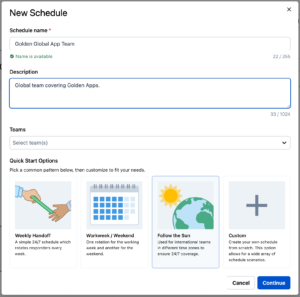
- New Quick Start options: Common schedule options accelerate new schedule creation.
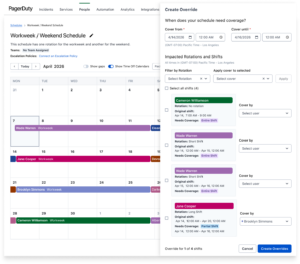
The new interface offers clear visibility into scheduling conflicts and makes override management simple.
5 Things You Can Start Doing in Schedules Today
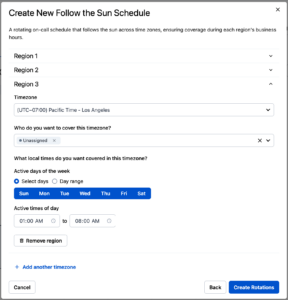
- Launch a “Follow-the-Sun” Rotation in Minutes: Eliminate the manual math of timezone offsets. Use our pre-built patterns to ensure global coverage that respects local working hours.
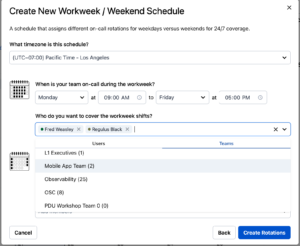
- Add Whole Team To Rotation with One Click: Add individual users or whole teams to a rotation with the click of a button, removing the need to search through the whole user directory.
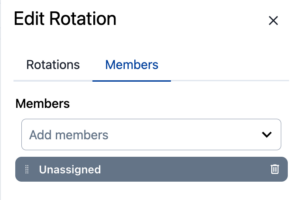
- Enable Self-Service Scheduling: Use “Unassigned” shifts to allow team members to volunteer for open slots, reducing the administrative burden on managers.
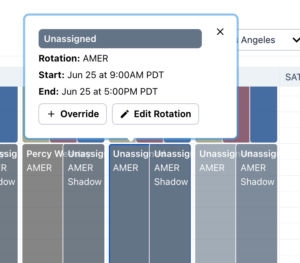
- Scale with Multi-Responder Shift Assignments: Configure your schedules to allow multiple people to be on-call simultaneously. This enables collaborative response and shared workload, ensuring that no single responder has to carry the burden of complex incidents alone.
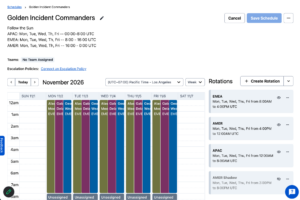
- Efficiently Cover Shifts with Multi-Shift Overrides: Quickly and easily assign coverage for PTO across multiple days to ensure the right team member is contacted at the right time. (audit trail, see Enablement content, keep it concise)
- The Golden Rule for Coverage: Custom Shifts vs. Override Precision: Stop using one tool for two jobs. We’re now introducing Custom Shifts to eliminate the confusion and accidental coverage gaps that used to happen when using overrides as a catch-all tool for managing any on-call schedule exceptions. Here’s a breakdown of when to use Custom Shifts vs. Overrides:
|
Scenario |
Purpose |
The Golden Rule |
|
Custom Shift |
Use this to fill an open gap (like a holiday) or to add an extra responder without removing the original person. |
If removing your change leaves a coverage gap, use a Custom Shift. |
|
Override |
Use this to replace the originally assigned responder for a specific period (e.g., covering a shift for PTO). |
If removing your change simply returns the original person to their shift, use an Override. |
See It in Action
Explore how Shift-Based Schedules bring precision back to your operations:
- Demo Video: Deep dive into the “why” behind the shift-based model.
- Product Tour: See the new UI in action
- Knowledge Base
Drive Measurable Impact at Every Tier
For many organizations, reducing manual toil brings response times down to as low as one minute. By adopting Shift-Based Schedules, you aren’t just updating a tool; you are retiring risk and empowering your engineers to focus on innovation rather than logistics.
Availability and Schedule Upgrades
Shift-Based Schedules are available to customers across all plans in Web UI, API*, Mobile App (view + limited overrides), and Terraform.
- New Customers: Starting at GA planned in May 2026, all new customers can get access to the new shift-based scheduling experience from day one.
- Existing Customers: You’ll get access to both scheduling systems! Your current schedules will continue working and stay fully editable.
Important note: Shift-based schedules use the V3 API and are not compatible with V2 automations. To create automations for Shift-Based Schedules, you need to:
- Update your automations to use the V3 API for all new shift-based schedules
- Keep the V2 endpoint for your existing schedules
An upgrade tool for existing schedules is coming soon; your legacy schedules will keep working in the meantime. Learn more here.
Paving the path to autonomous operations
Shift-Based Schedules is just another example of how we’re helping customers move from manual coordination towards autonomous operations. The added flexibility gives AI the context it needs for Human + Agent Incident Response – automating routing decisions so the right expertise responds every time.
Ready to see how Shift-Based Schedules can simplify global coverage management and handle complex rotations effortlessly for your team? Keep an eye out in the PagerDuty UI – the new experience will start rolling out to all plans in May.