
- PagerDuty /
- Blog /
- Best Practices & Insights /
- Incident Communications With Alina Anderson
Blog
Incident Communications With Alina Anderson
by Mandi Walls
January 13, 2021
| 8 min read
Incidents happen. They’re disruptive, they can be stressful, and if they aren’t managed well, they can cause chaos on your team. How your team manages incidents is only half the battle. How you let other stakeholders know what is going on is the other half.
Alina Anderson from Smartsheet joined the Community team in our booth this year at PagerDuty Summit to talk about Incident Communications, and we’ve shared that conversation as an episode of our Page It to the Limit podcast.
Incident response practices might differ between teams, but your customers don’t know that— and you don’t want them to know that. So when a major incident impacts your customer-facing services, how do you let everyone know that folks are working on a solution?
How Do You Define a Major Incident?
Organizations define major incidents differently using various criteria. At the most general definition, a major incident is one that requires a coordinated response between multiple teams. Your organization might have more specific criteria:
- More than X% of customers are affected
- More than Y% of responses are returning errors
- A selection of errors on a key service like logins or checkouts
Whatever your criteria are for declaring a major incident, responding to one requires an additional level of coordination among teams. You might make use of an incident commander to keep the response effort running smoothly. Everyone wants to see the incident cleared as quickly as possible so services can be restored and business can go back to normal. People who aren’t working on the incident itself will want to know what is going on—and so will your customers. Keeping everyone informed in a timely manner is an essential part of your response practice.
The same applies for internal stakeholders as well. Teams that aren’t directly involved in responding to an incident will want to know what is going on. The sales folks who have a demo planned. The marketing team that has an email scheduled to go out. Trainers onboarding new customers. When everyone’s shared success relies on services being available that are having some trouble, everyone gets stressed.
Incident Communications
We talked with Alina about the changes Smartsheet has made over the past year or so to their incident response and incident communications process. Smartsheet is a user-facing application for teams to collaborate on spreadsheets, because when things aren’t working, people aren’t working. You’ve probably encountered outages or errors on sites you use, even if it was just a secondary feature.
As an organization grows, adding not just customers but also more employees, keeping everyone informed in a timely manner when something is happening really shouldn’t be left to chance. As Alina shared with us, Smartsheet’s growth over the past few years “broke open gaps” they had in their communications practice. They didn’t have the appropriate infrastructure in place to deal with large complex incidents across their growing organization.
Adding intentional, formal communications to your incident response process can take some time and practice, but knowing your users and being mindful of their needs will help you get it right. When creating a plan for your incident communications, you want to have representation from customer support, social media, and other channels that your organization already uses to communicate with your customers.
Smartsheet’s practice looks a bit like a relay race. While responders are working on the incident, they don’t have time to also be monitoring customer reports, or social media. So dedicated team members take those tasks, communicating outbound but also gathering information from users in various channels. These folks mobilize for major incidents the same way responders do.
Incident Response Teams
In our Incident Response Ops Guide, we describe two suggested roles to establish for your incident response process: the Customer Liaison and the Internal Liaison. These are specific, pre-assigned roles that individuals will be assigned, and may be on-call for within your organization. When a major incident occurs, your liaisons will join the response with the express purpose of making sure that information is communicated to the appropriate stakeholders and customers in a timely manner.
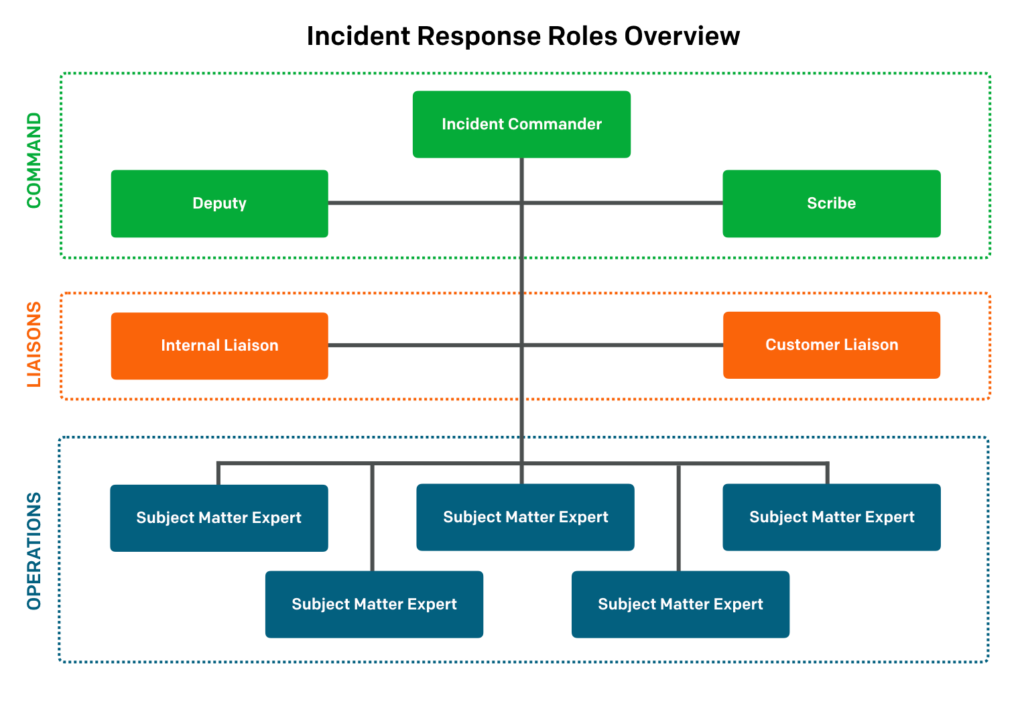
There are a few tasks to do in preparation for future incidents when your team is adding communications roles to your incident response process.
- Prepare generic messages ahead of time that can be used before you know what is going on, such as:
- “We are aware of an incident impacting users, and our team is investigating.”
- Prepare messages around the high-level phases of your response process
- “A fix has been developed and is currently being deployed…”
- “The issue has been resolved”
When you have a set of generic messages, your liaisons can then devote time to specialized messages for a particular incident.
The Customer Liaison will also keep track of incoming messages from users and customers and decide how they should be tracked. You may find important context in what customers are reporting, such as verifying which customers are affected by region or feature set.
Internal Liaisons have a similar set of tasks, but their audience is internal stakeholders. So they won’t be composing tweets or social media updates; instead, they might be sending messages to your executive leadership team to keep them informed. The Internal Liaison can also be responsible for asking additional stakeholders to join an incident call to provide information or expertise.
Your organization should establish who your stakeholders are and how they will be contacted during an incident. They might have a team set up in PagerDuty, a dedicated chat channel, or an email list, depending on their preferred communication methods.
After an incident has been resolved, your liaisons should keep an eye on their channels to make sure everyone is seeing the resolution and knows that the incident is over.
Incident Communications Best Practices
There are a few additional things to keep in mind when you are working on incident communications that will help your customers and users.
- If there are workarounds, let folks know how to use them
- Don’t estimate resolution times. Getting a bad estimate is worse than no estimate.
- Don’t provide too much detail. Focus on what users will see, not what is going on in the background.
If you’re using social media, keep in mind which platforms have character limits and plan your updates accordingly. If you need to add more detail, consider posting your status updates on a different site or service and then linking from platforms with limits.
Your internal stakeholders may want more details than you’d give your customers, but it still should not be necessary to update them more frequently than updates go out to customer channels.
It’s important to create intentional workflows and specific messaging for major incidents, and to communicate clearly so customers and stakeholders understand what is happening. Building this practice helps build customer trust and loyalty—even when incidents happen. Proactively keeping your internal stakeholders informed reduces the chance that they will join a call unnecessarily or distract responders from working to resolve the incident.
Plan to Learn
Creating a communications plan for your incident response emphasizes for your teams how important it is, and will be, for your organization to communicate effectively during an incident. You don’t want to be trying to figure out your language or communications channels in the middle of an ongoing incident. When you have a plan, folks can anchor their decisions to the plan, reducing their personal stress and uncertainty in the moment.
Alina shared with us that one of the surprises Smartsheet encountered on their incident response journey was how much personal development plays a part in the whole team becoming better at incident response and incident communications. Part of learning from your incidents is also learning from the communications tasks that happened, and talk about what worked well and what didn’t. You might find that your update intervals are too long—maybe customers would have preferred updates more often than every hour.
Your incident communications practice will benefit from a culture of learning and experimentation, like other aspects of your workflow. If you’d like to learn more about incident response, you can check out our Ops Guide at https://response.pagerduty.com, download our episode of Page It to the Limit with Alina, or watch Alina’s session from PagerDuty Summit 2020.